
Shihlin SC3 user manual

Shihlin SC3 User Manuals
Shihlin SC3 is a compact Variable Frequency Drive designed for speed control of AC motors. It is suitable for small and medium-sized machinery, fans, pumps, conveyors and other general industrial applications.
Compact motor-control design: The SC3 is designed for electrical panels where installation space is limited. Controlling motor speed according to actual process demand can also provide energy-saving benefits in suitable applications.
Filtering and protection: The source technical information lists a built-in RFI filter, overload protection and voltage-protection functions. Proper panel wiring, shielding and grounding are still important for reducing electromagnetic interference.
Selected SC3 technical features
• Starting torque: source data states 180% at 3 Hz and 200% at 5 Hz
• Short-duration overload capability: 150% for 60 seconds and 200% for 1 second
• Built-in RFI filter
• Simple commissioning
• DIN-rail mounting option
• Compact side-by-side panel installation
• Standard Modbus communication
• SINK / SOURCE selectable digital inputs
• Source information lists an output-frequency range up to 650 Hz
A high inverter output frequency does not mean that every motor can safely operate at the corresponding mechanical speed. Always check the motor's permitted maximum speed, bearing limits and mechanical-system specifications.
Modbus communication: Standard Modbus communication allows the SC3 to be integrated with PLCs, HMIs and other industrial automation equipment.
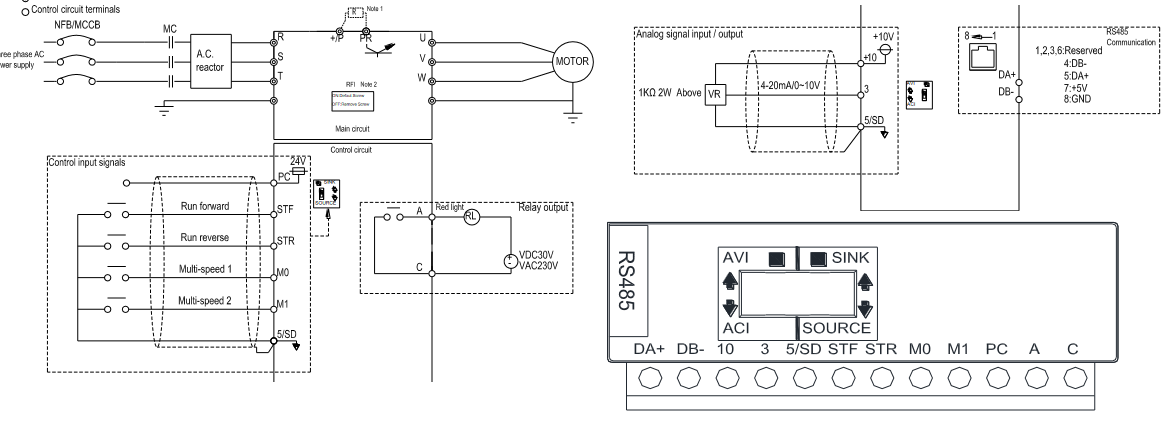
SINK / SOURCE digital inputs: The SC3 provides selectable SINK / SOURCE control inputs. This allows the digital-input logic to be adapted to the output type of the connected PLC, sensor or external controller.
Depending on the selected input configuration, NPN or PNP sensors can be used to activate the drive inputs. The correct wiring method should be selected according to both the SC3 terminal diagram and the output type of the external device.
SINK input operation: In SINK mode, the relevant control input is activated through the SD common terminal or by an external transistor output. When an external PLC or sensor supply is used, the SD and PC terminal arrangement should follow the wiring diagram in the SC3 manual.
Shihlin SC3 User Manual – PDF
View / Download Shihlin SC3 VFD User Manual
Shihlin SC3 Fault Codes: If the drive displays an alarm or fault code, see our Shihlin VFD Fault Codes page.
Shihlin SC3 Technical Support
Shihlin SC3 Main Page |
Shihlin Fault Codes |
Setup & Commissioning
Shihlin and Related Pages
Shihlin Main Page |
Shihlin Manuals & Software |
Shihlin VFD Prices |
Shihlin Contact |
About Shihlin
Other Shihlin VFD Series
Shihlin SS2 |
Shihlin SE2 |
Shihlin SF / SF-G