
INVT VFD Software
INVT Studio and INVT Workshop
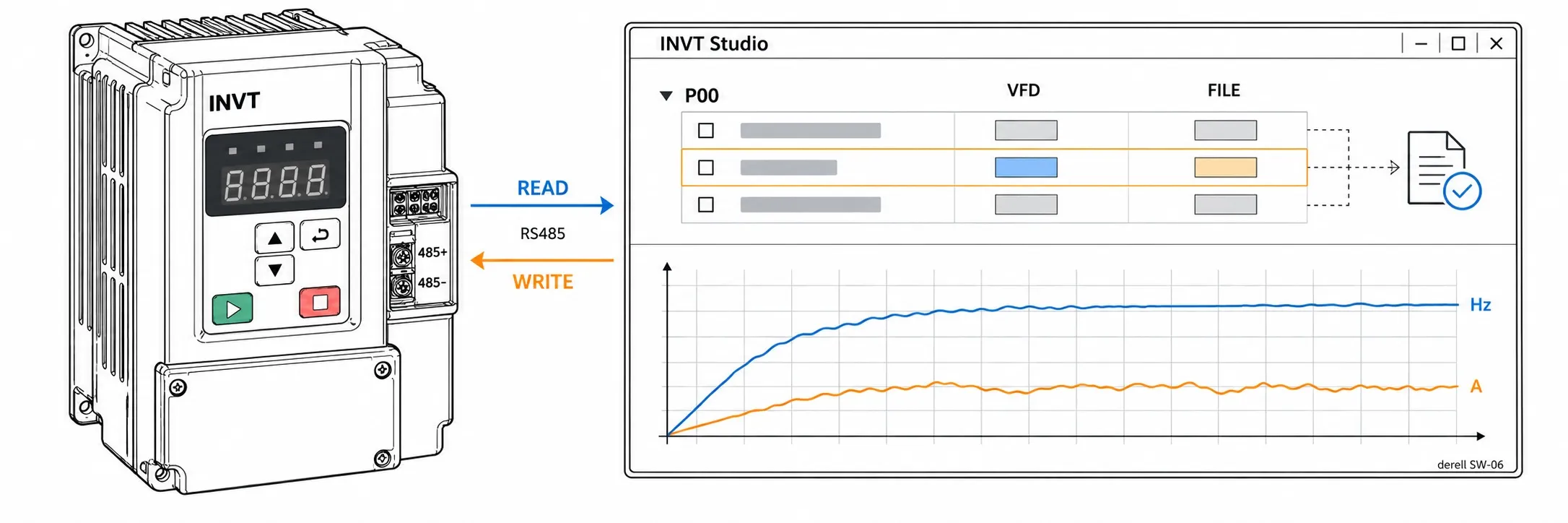
INVT Studio and INVT Workshop let you monitor compatible INVT variable-frequency drives from a PC and read, back up or compare their parameters. Before choosing the software, check the drive’s complete model code, hardware suffix if present, firmware version and communication port.
Software and drive compatibility · First connection · PDFs and software sources
Which software fits your drive?
INVT Studio V1.3.1 is the legacy PC package listed in the manufacturer’s archive. INVT’s serial Modbus list covers GD10, GD35, GD100, GD200, GD300, GD800, IPE200, CHF100A, CHV100A, CHV190 and CHE100. The Ethernet UDP list covers GD35, GD300, GD800, GD5000, CHV100A and CHV190. Match the Ethernet hardware and model variant to the drive manual. INVT’s Studio specifications list Windows XP and Windows 7. If you use Windows 10 or 11, check compatibility for both the application and the adapter driver.
INVT Workshop V3.6.0.6 is listed in the manufacturer’s software archive. The Goodrive350 manual, for example, documents Workshop for reading and writing groups of parameters, monitoring status and viewing fault records. Check model codes separately for GD200 and GD200A, or GD100 and GD100-PV. See the INVT VFD drive families for series information.
First connection and parameter backup
For a serial connection, check the drive’s RS-485 terminal diagram and select a suitable USB–RS-485 adapter. For Modbus RTU, match the COM port, device address, baud rate, parity and stop bits to the existing setup. If you are reading data from a PLC or HMI, compare the INVT Modbus address examples with the register table for your series.
Start by reading from the drive to the PC. Save the backup with the machine name, drive model, firmware and date. Before writing a parameter file, review the differences and check the run-command source separately from the frequency reference. For terminal control, review the three-wire control, sink/source input arrangement and preset speed selections.
Related topics
When comparing motor settings, check the motor’s rated frequency, the drive’s base frequency and the selected control mode. The guides to V/f control, vector control and motor auto-tuning explain these settings. If a pump uses PID control, record the feedback source and scaling too.
When diagnosing a trip during deceleration, record the acceleration and deceleration ramps and any S-curve setting. If the software supports it, review the trace with the current limit, DC bus voltage and any fitted braking resistor in mind. Use the general VFD fault guide and INVT fault codes to find the applicable series manual.
Editor’s Note
Start with a photo of the nameplate. When a machine is down, you’ll want to know at a glance which drive the backup belongs to.
If the PC won’t connect, check the COM port and adapter first. Then compare the device address and serial settings one by one.
Before clearing a fault, write down the code and what the machine was doing. Did it trip on startup, under load or while stopping? That detail can save you a lot of time.
Make a backup and open it again to make sure it’s readable. If you need a factory reset, you’ll have a record of the starting settings.
Run, direction and parameter-write commands in the software can affect the machine. Test with authorized personnel and follow the machine’s safe-working procedure. For equipment with STO, arrange electrical isolation separately.
OtomasyonAVM PDFs and related INVT software
Start with INVT VFD Documents and INVT User Manuals to find documentation by series. Check the communications and function-code sections of the GD10 User Manual (English PDF) or GD20 User Manual (English PDF) against the drive model you have.
For the rest of the machine, see INVT PLC Software and PLC CPU Documents, INVT HMI Software and HMI Documents, or INVT Servo Software and Servo Documents.
INVT categories · INVT brand home · VFD drive families · VFD documents
Manufacturer downloads and references
In the INVT Download Center, select Software and search for the package name. The INVT software archive lists Workshop V3.6.0.6 and Studio V1.3.1 as separate RAR packages.
INVT Studio connection modes and drive list · GD350 V2.1 manual with Workshop details (English PDF) · INVT PC connection FAQ