
Faq For Ethernet?
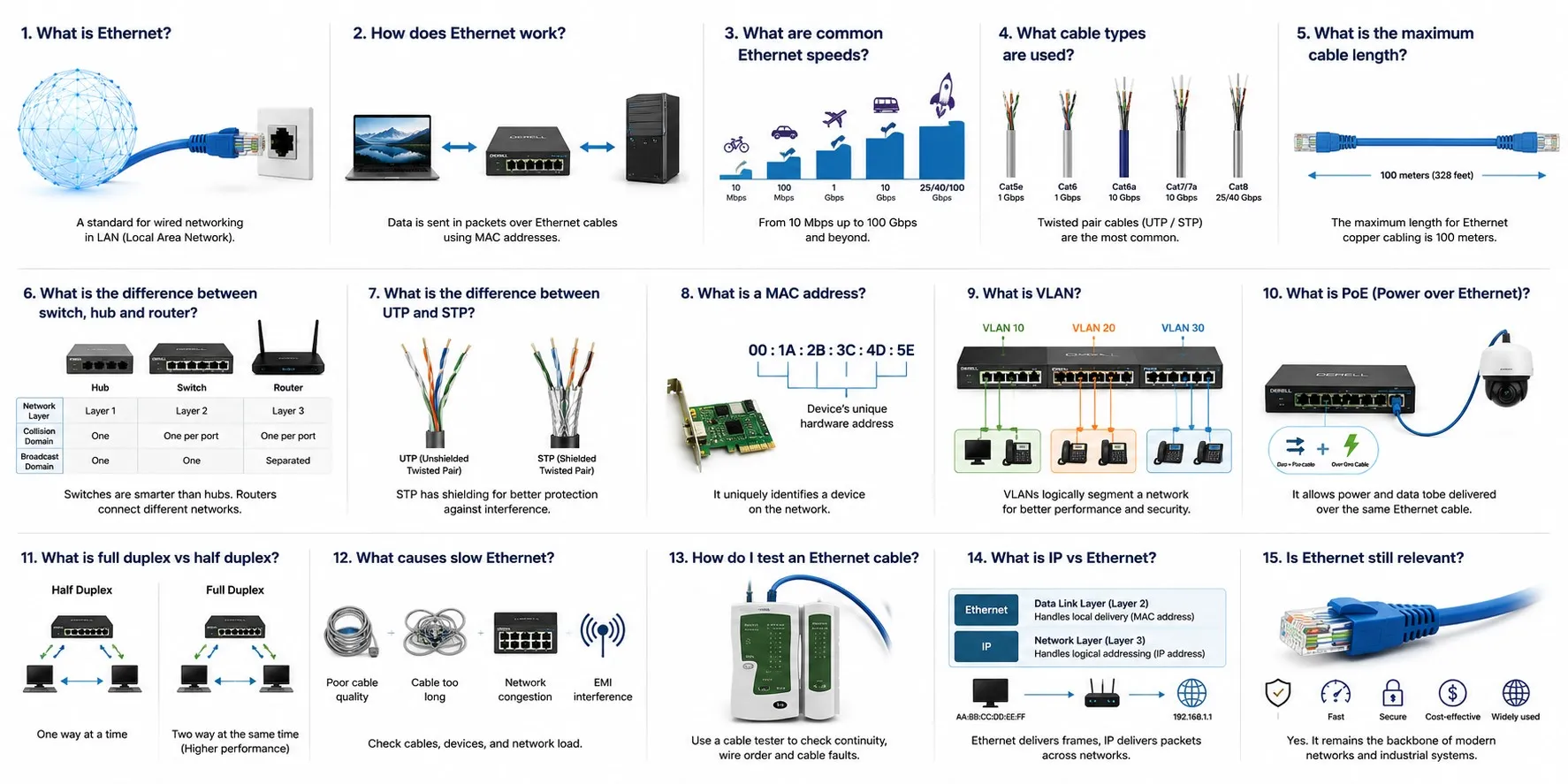
Ethernet is a family of wired networking technologies defined primarily by the IEEE 802.3 standards. It specifies physical and data-link-layer communication for networked devices and has evolved from early shared coaxial networks into switched copper and fiber systems used in homes, offices, data centers and industrial communication.
In simple terms: Ethernet provides the network infrastructure that carries data frames between devices. It does not by itself define commands such as “start this motor,” “read this sensor” or “move this servo axis.” Those automation functions are provided by higher-level technologies such as EtherNet/IP, PROFINET, Modbus TCP or EtherCAT.
A short history of Ethernet
Ethernet originated at Xerox PARC in 1973 through the work of Robert Metcalfe and colleagues. Digital Equipment Corporation, Intel and Xerox later published the DIX Ethernet specification in 1980, and Ethernet was adopted as the IEEE 802.3 standard in 1983.
Early systems used shared coaxial cable. Ethernet later moved toward twisted-pair copper, fiber optics and switched star networks, while available speeds increased from 10 Mbit/s to Fast Ethernet, Gigabit Ethernet, 10 Gigabit Ethernet and much higher-rate standards.
For a dedicated overview, see What is the history of Ethernet?
How does modern Ethernet work?
Modern Ethernet devices are normally connected through an Ethernet switch. The switch learns MAC addresses and forwards Ethernet frames toward the appropriate destination ports rather than sending every frame to every device.
Older shared-medium Ethernet relied heavily on CSMA/CD — Carrier Sense Multiple Access with Collision Detection. Modern switched full-duplex Ethernet has effectively removed ordinary collision domains from normal point-to-point switch links, so CSMA/CD is mainly of historical importance in current installations.
A more detailed explanation is available at How does Ethernet work?
What is an Ethernet frame?
Ethernet transfers data in units called frames. A standard frame includes a destination MAC address, source MAC address, type/length information, payload and a Frame Check Sequence used to detect transmission errors.
When a PLC communicates with an HMI, drive or engineering computer through an Ethernet-based protocol, the application data is ultimately transported inside Ethernet frames on the physical network.
See What is the structure of an Ethernet frame? for a field-by-field explanation.
What is a MAC address?
MAC — Media Access Control address is the Layer 2 address used by Ethernet interfaces. Standard Ethernet MAC addresses are normally 48 bits long.
A PLC, managed switch, HMI, camera or industrial controller can have its own Ethernet MAC address. A MAC address and an IP address are not the same thing: MAC addressing operates at the data-link layer, while IP provides network-layer addressing and routing.
Are Ethernet and TCP/IP the same thing?
No. Ethernet primarily defines Layer 1 and Layer 2 networking. IP provides network addressing and routing, while TCP and UDP operate higher in the protocol stack.
A device having an Ethernet connector does not automatically mean that every message on that network uses TCP/IP. EtherCAT, for example, uses Ethernet frames in a very different way from a conventional TCP/IP application.
What is Industrial Ethernet?
Industrial Ethernet is a broad term rather than one single protocol. It covers automation technologies that use Ethernet physical networking while adding industrial device models, real-time communication, diagnostics or synchronization mechanisms.
On one production line, Ethernet-based communication can carry values from sensors, I/O states from PLCs, status data from VFDs, position information associated with encoders, HMI traffic and production information for upper-level systems.
Devices must still support the same industrial protocol. Two products both having RJ45 ports does not mean that a PROFINET device can automatically exchange real-time I/O with an EtherNet/IP device.
How is Ethernet used with PLCs and HMIs?
Modern PLCs commonly use Ethernet for programming, controller-to-controller communication, remote I/O, diagnostics and communication with operator panels.
An HMI panel can read tags, registers or process values from a PLC through an Ethernet-based automation protocol. At a higher level, selected data can be transferred to a SCADA system for alarms, trends, reporting and plant supervision.
How is Ethernet used with variable frequency drives?
Ethernet-connected AC drives and VFDs can exchange run commands, speed references, actual frequency, motor current, status words, fault codes and parameters with the control system.
The phrase “Ethernet drive” is not specific enough by itself. The drive may support EtherNet/IP, PROFINET, Modbus TCP, EtherCAT or another Ethernet-based protocol, and the controller must support the same communication method.
Is Ethernet used in servo and motion-control systems?
Yes. Ethernet-based real-time networks are widely used in modern servo systems and motion-control applications.
A major example is EtherCAT, which is optimized for fast distributed I/O and synchronized motion applications.
Standard Ethernet bandwidth alone does not guarantee precise motion synchronization. Cycle time, synchronization, jitter and the design of the industrial protocol all matter.
How is Ethernet used in industrial robotics?
Modern industrial robot cells often use Ethernet-based links between the PLC, robot controller, vision system, HMI, safety equipment and plant network.
The internal servo network of the robot does not have to use the same protocol as the PLC interface. A robot controller may use a specialized internal motion bus while communicating with the machine PLC through EtherNet/IP or PROFINET.
What does an Ethernet switch do?
An Ethernet switch connects devices on the same Layer 2 network and forwards frames according to its learned MAC-address table.
For industrial use, switch selection may involve much more than port count. DIN-rail mounting, temperature rating, redundant power inputs, managed VLANs, QoS, ring redundancy and diagnostics can all be important.
The difference between old shared hubs and modern switches is explained in What is the difference between an Ethernet switch and a hub?
Industrial switches, communication gateways and controllers also require a stable DC source, so the capacity and quality of the industrial power supply should be considered in panel design.
What is Power over Ethernet — PoE?
PoE — Power over Ethernet allows compatible Ethernet cabling to carry both network data and DC power to supported devices.
PoE is commonly used for IP cameras, access points and other network equipment, and it can also be useful with selected industrial sensors, terminals and embedded Ethernet devices.
Not every Ethernet port supports PoE, and the supported PoE standard and power class must be checked before connecting equipment. See What is Power over Ethernet (PoE)?
Which cables can Ethernet use?
Ethernet can use balanced twisted-pair copper, multimode fiber, single-mode fiber and other media defined for particular IEEE Ethernet standards.
Cat 5e, Cat 6 and Cat 6A cabling are common in copper networks, but cable category alone is not enough for industrial environments. Oil resistance, continuous flexing, temperature, shielding, grounding and connector type may also matter.
When Ethernet cable is installed near contactors, relays and switchgear, or beside motor output cables from large drives, cable routing and EMC practice become especially important.
How long can an Ethernet cable be?
For common 100BASE-TX and 1000BASE-T twisted-pair installations, the normal Ethernet channel length is in the 100 m — 328 ft class. This is not a universal distance limit for all forms of Ethernet.
Fiber Ethernet links can operate from hundreds of metres to many kilometres depending on the optical standard and transceiver.
See What is the maximum length of an Ethernet cable? for more detail.
What Ethernet speeds are available?
Ethernet is not one fixed-speed technology. The family includes 10 Mbit/s, 100 Mbit/s, 1 Gbit/s, 10 Gbit/s and much higher data-rate standards.
In factory automation, higher nominal bandwidth does not automatically mean better machine-control performance. Latency, jitter, switch architecture, network load and the selected control system protocol can be just as important as raw link speed.
See What are the different speeds of Ethernet?
What is TSN — Time-Sensitive Networking?
TSN refers to a family of IEEE 802.1 technologies that add mechanisms such as time synchronization, traffic scheduling and bounded-latency handling to Ethernet networks.
The goal is to allow time-sensitive control or motion traffic and ordinary network traffic to coexist more predictably on Ethernet infrastructure.
TSN is not itself a PLC application protocol. Higher-level industrial technologies can use selected TSN features as part of their own communication architecture.
Is an Ethernet network automatically secure?
No. A working Ethernet link does not provide automatic cybersecurity. Network segmentation, VLANs, firewalls, access control, authenticated management and the security capabilities of the actual application protocol need to be considered separately.
This is particularly important when PLCs, SCADA servers and engineering workstations are connected to larger plant or enterprise networks.
What are the main Ethernet-based industrial protocols?
EtherNet/IP uses CIP on standard Ethernet and IP networking and is widely used for PLCs, drives, remote I/O, sensors and robots. See How is EtherNet/IP used in industrial automation?
EtherCAT is optimized for real-time distributed I/O and motion applications and processes data while the Ethernet frame passes through devices.
Modbus TCP carries the Modbus application model over TCP/IP and Ethernet and is widely supported by PLCs, meters, drives and intelligent field equipment.
PROFINET is another major industrial Ethernet architecture used with PLCs, remote I/O, drives and factory automation systems.
These technologies can use similar Ethernet cables and connectors without being application-level compatible with each other.
EtherNet/IP is not the same as Ethernet
The name can be confusing. EtherNet/IP means Ethernet Industrial Protocol; it is not another name for ordinary Ethernet and the “IP” refers to Industrial Protocol in the product name while the technology also operates over standard Internet Protocol networking.
EtherNet/IP uses CIP for industrial device communication. For example, a scanner/controller can exchange cyclic I/O with adapters such as remote I/O, drives and intelligent sensors.
For the dedicated topic, see What is EtherNet/IP?
What is EtherCAT?
EtherCAT is a real-time industrial Ethernet technology originally developed by Beckhoff. Instead of handling every field device as a conventional TCP/IP endpoint, EtherCAT devices process relevant data as the frame passes through the network.
This architecture is especially useful in fast I/O and servo-motion systems requiring short cycle times and precise synchronization.
How should an Ethernet fault be diagnosed?
Start with the physical link. Check link/activity LEDs, cable condition, connector seating and the Ethernet switch port.
Next verify IP address, subnet mask and, where required, gateway configuration. Duplicate IP addresses are a common source of intermittent or confusing behaviour.
If basic Ethernet connectivity works but industrial communication does not, check the application protocol. Device name, EDS/GSDML or other configuration files, PLC I/O mapping, TCP/UDP settings and protocol-specific connection parameters may still be wrong.
Being able to open the web page of a drive does not prove that cyclic PLC I/O communication is correctly configured. Basic Layer 2/3 connectivity and industrial application communication should be diagnosed separately.
Practical Ethernet troubleshooting checklist
1. Are the link and activity indicators active?
2. Is the correct Ethernet cable and connector being used?
3. Are the IP address and subnet mask correct?
4. Is there a duplicate IP address on the network?
5. Is the Ethernet switch port and VLAN configuration correct?
6. Do both devices support the same industrial Ethernet protocol?
7. Is the data cable routed correctly away from high-power VFD, servo and switching cables?
8. Is the protocol-specific PLC or HMI configuration correct?
Ethernet FAQ — Detailed Topics
What is Ethernet? · How does Ethernet work? · History of Ethernet · Ethernet Speeds · Ethernet Frame · Maximum Cable Length · Power over Ethernet · Ethernet Advantages and Disadvantages
Ethernet-Based Industrial Networks
EtherNet/IP · EtherCAT · Industrial Communication
Related Field and Automation Pages
PLCs · HMI Panels · SCADA · Sensors · Encoders · Servo Systems · Motion Control · Industrial Robotics · AC Drives and VFDs · Power Supplies · Switchgear · Controllers