
What is Ethernet? How it works in an industrial network
Ethernet is a family of networking technologies standardized in IEEE 802.3. It defines physical transmission methods and MAC functions for exchanging frames over a link. Copper and optical implementations exist at different speeds. Ethernet is not another name for the internet, an application protocol, or a particular connector.[1]
A plain-language example: imagine an operator panel asking a PLC for a temperature reading. Ethernet provides part of the path carrying that conversation. Finding the destination, choosing the message format and understanding the returned number are separate tasks. A cable connection alone does not make the two devices understand each other.
Start with a small machine network—not the internet
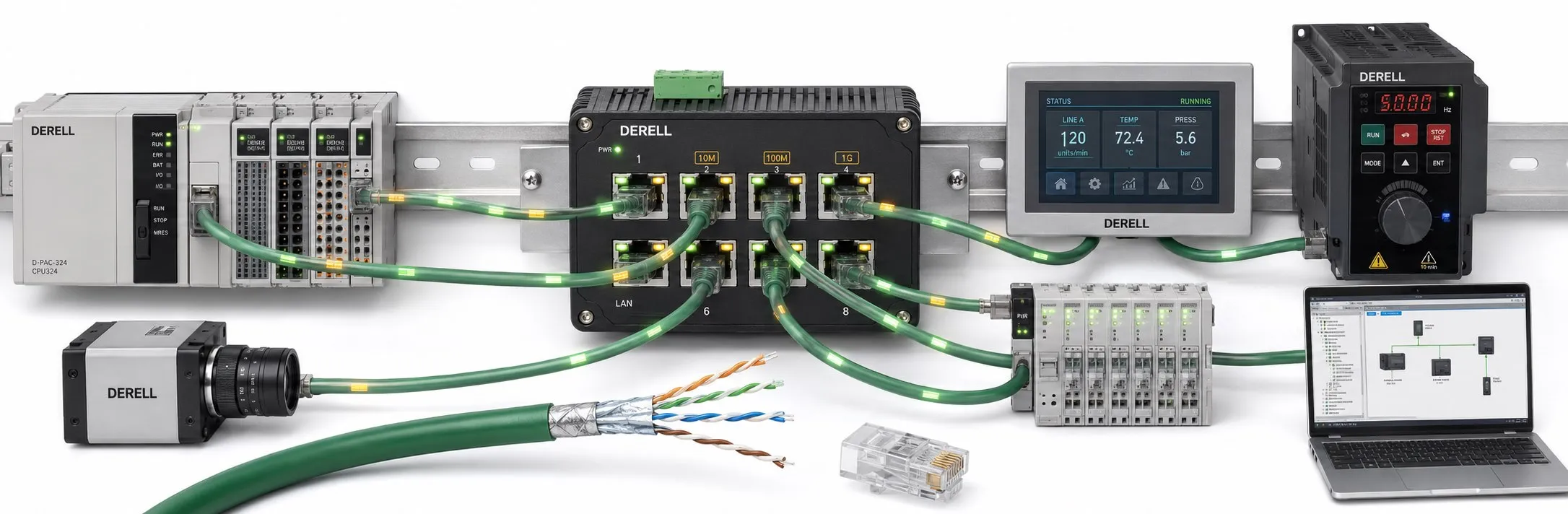
Consider an illustrative local network with a PLC, an HMI and an engineering laptop. They share one switch/VLAN, use the same /24 subnet and have no access rule blocking communication. The private IPv4 addresses below are an example, not settings to copy into a running installation.[14]
| Device | Example IPv4 address | Subnet mask |
|---|---|---|
| PLC | 192.168.10.10 | 255.255.255.0 |
| HMI | 192.168.10.20 | 255.255.255.0 |
| Engineering laptop | 192.168.10.30 | 255.255.255.0 |
The HMI can communicate locally with the PLC without an internet modem. IP sends directly to an on-link destination; traffic for another network needs a suitable route. A router genuinely present at 192.168.10.1 could provide that path. The gateway address is not the PLC address. Addresses may be deliberately assigned or supplied through an appropriate DHCP service.[2][15]
Even in this correctly connected example, the HMI still needs the right application protocol, device role and data address. A wrong register can return a perfectly valid but irrelevant number. This is the distinction between having a network connection and using the right process data.
Separate Ethernet, IP, transport and the application
An IPv4 packet can travel inside an Ethernet frame without becoming the same thing as Ethernet. RFC 894 defines EtherType 0x0800 for this encapsulation: the IP header and IP data occupy the Ethernet data field. The Ethernet source and destination addresses belong to a different part of the frame.[7]
| Part of the system | Responsibility |
|---|---|
| Physical medium / PHY | Transmits and receives the electrical or optical signal. |
| Ethernet MAC / switch | Handles local frame communication and MAC-based forwarding. |
| IP / router | Handles IP addressing and routing between networks. |
| TCP or UDP | Provides a transport service between applications. |
| Application protocol | Defines what messages mean and which operations a device understands. |
TCP provides a reliable, ordered byte stream using acknowledgments and retransmission. UDP does not itself guarantee delivery or protection against duplicate delivery. Neither is synonymous with Ethernet. The separate guide to protocols running over Ethernet follows these different responsibilities.[8][9]
Ethernet is a wired-network technology family; Wi-Fi supplies a wireless local link. The two can be bridged, but they are not the same physical connection. In a machine design, mobility, cable routing and interruption tolerance matter as well as speed. See the Ethernet versus Wi-Fi comparison for that separate choice.
The port tells you less than the device specification
A network interface card, or NIC, connects a host to the network; the PHY handles physical signaling. Texas Instruments’ DP83867IR is a concrete example: it supports 10/100/1000 Mbit/s and MAC-side MII/GMII/RGMII interfaces. Those properties do not by themselves create a PLC program, EtherCAT MainDevice or CIP implementation. Additional device logic and software are required.[11]
Apply the same distinction when selecting equipment. A model-level resource such as the Inovance H3U PLC guide is a useful route into interface and programming questions. Then check the exact CPU and supported roles against the manufacturer’s manual. Being in a PLC catalog—or having an Ethernet connector—is not evidence that every industrial protocol is implemented.
What the switch learns, and where the frame goes
A switch learns from the source MAC address of received frames. For a known unicast destination, its forwarding information identifies the appropriate port. Unknown destinations and broadcast traffic need different handling: frames may be flooded to eligible ports in the relevant VLAN. “A switch sends every frame only to its final recipient” is therefore an incomplete explanation.[4]
The MAC address supports local frame delivery, whereas IP belongs to another layer. For IPv4, ARP can resolve the local next-hop Ethernet address needed for transmission. The data-transmission guide follows that path; the switch-versus-hub guide separates switched links from the shared medium created by a hub.[3]
IEEE 802.1Q covers bridging and VLANs. A VLAN can provide logical separation on suitable switches, but it is not a reason to connect redundant cables arbitrarily. A physical ring needs a suitable loop-control design. Nor is a normal switched ring the same as the junction traversal described in EtherCAT topology.[5][21]
Full duplex removes collisions—not every source of delay
On a modern switched full-duplex link, both endpoints can transmit and receive simultaneously. The shared-medium collision mechanism of half-duplex Ethernet does not apply to that link. Queues and dropped traffic can still exist. Describing every Ethernet connection through the behavior of an old hub network misses this distinction.[22]
FCS/CRC detects corrupted frames; it does not repair the payload or issue an application-level request to send it again. Where TCP is used, TCP can recover losses through retransmission. Frame reception also does not prove that the receiving application carried out a command. Keep the Ethernet frame separate from the wider protocol and application behavior.[6][8]
Choose the medium and the link—not just a cable label
A cable decision combines physical interface, speed, distance and environment. Cat5e, Cat6 or Cat6A is not a complete installation specification. Optical links likewise need compatible transceivers, fiber and supported link conditions. The cable-types guide and maximum-cable-length guide address different parts of that choice.
For example, Beckhoff’s documented 100BASE-TX connection uses two data pairs on RJ45 contacts 1–2 and 3–6, with a 100 m node-to-node limit. That is not a pinout for every Ethernet implementation: 1000BASE-T uses four pairs. A 100 m limit belongs to the specified link or channel, not to the total length of an entire factory network. Adding another active device creates further links and further design requirements.[10][6]
Do not improvise power connections. RJ45 contacts do not have universal “power in,” “power out” or “shielding” assignments. Use the manufacturer’s wiring information for the actual interface. An RJ45 socket does not authorize applying 24 V to it.
PoE is an additional power arrangement, not a property of every Ethernet port
Power over Ethernet combines data and power in a suitable installation. The PSE supplies power; the PD consumes it. Port capability, device demand and the total budget must agree. The PoE guide treats this separately from the general power-supply choice.[12]
TI’s TPS23861 shows the difference in real hardware: this PSE controller detects a valid PD signature, performs classification and then applies power. That is not the same as an unconditioned passive power adapter. EtherCAT P is also a separate compatibility question; see EtherCAT extensions rather than treating all power-and-data connections as interchangeable.[13]
A bit rate is not a file-transfer promise or a control-cycle guarantee
A 100 Mbit/s or 1 Gbit/s link rating does not directly specify when a file becomes usable or an actuator responds. Ethernet speeds, Gigabit Ethernet and latency answer different engineering questions.
Illustrative calculation: exactly 1,000,000 bytes contains 8,000,000 bits. Considering only those data bits gives 80 ms at 100 Mbit/s or 8 ms at 1 Gbit/s. This is not a measured file-transfer time. Framing, protocol overhead, spacing, queues, retransmissions and endpoint processing are excluded. The data is not sent as one enormous Ethernet frame.
The conventional IPv4-over-Ethernet 1500-byte IP datagram allowance is not the total frame length. Small payloads may require padding; larger transfers are packetized. Before blaming a slow screen update on Ethernet speed, check how frequently the measurement is refreshed and how often the application requests it.[7]
Industrial Ethernet names describe different communication systems
EtherNet/IP combines standard Ethernet and TCP/IP technology with CIP. Its name does not mean every network that carries IP over Ethernet.[16]
PROFINET includes controller/device communication and real-time mechanisms such as RT and IRT. EtherCAT uses MainDevice-generated frames whose process data is handled on the fly by SubDevices. Sharing an Ethernet foundation does not make these device implementations interchangeable.[17][18]
The EtherCAT-versus-Ethernet comparison and industrial Ethernet protocol comparison explain the architectural choices. Real-time control performance is more than line rate: IEEE’s TSN work addresses bounded latency and timing variation. Required capabilities still have to be implemented and engineered across the actual network.[19]
Follow the signal all the way from the sensor to the screen
In one possible design, an analog input reads a sensor’s 4–20 mA signal, a PLC converts it to engineering units, and SCADA reads the result over the network. The sensor does not need its own Ethernet port. The interface distinction in device and sensor integration is useful here too. A wrong range or unit can produce a wrong value over a perfectly healthy network.
The same reading could be stored by a datalogger, made available through remote data access or summarized at an edge-computing node. These are architectural options, not automatic Ethernet functions. Adding IIoT connectivity does not require making the local machine-control task dependent on the internet.
Security and diagnosis are separate from merely establishing a link
Ethernet alone does not establish encryption, user authentication or machine safety. NIST’s OT security guidance treats protection alongside performance, reliability and safety requirements. Authorized access, controlled network boundaries and change records should be separate project concerns. Continue with Ethernet network security and industrial cybersecurity for that work.[20]
Diagnose in order: device power and physical link; link speed, duplex and error counters; then IP addressing, mask, VLAN and routing where IP is used; finally protocol, data address and data freshness. Increasing CRC errors and output-queue discards are different clues. EtherCAT adds mechanisms such as WKC and ESM states, covered separately in EtherCAT fault diagnosis.[6]
The practical conclusion: the right Ethernet connection is only one part of a working system. Verify the physical link, local network, addressing, application protocol and meaning of the data. The advantages and disadvantages guide supports selection; the topic directory below provides the deeper explanations.
References and technical scope
This guide uses public standards-scope records, relevant RFC sections and manufacturer technical pages. It does not claim a review of the complete paid standards. The local-network layout and transfer calculation are teaching examples, not device measurements.
[1] IEEE 802.3-2022 — Standard for Ethernet — Scope of the Ethernet MAC and physical-layer family.
[2] IETF RFC 1122 — Requirements for Internet Hosts, §1.1.3 / §3.3.1 — Layer separation and local delivery versus gateway routing.
[3] IETF RFC 826 — Address Resolution Protocol — Resolving an IPv4 next hop to its Ethernet address.
[4] Cisco — Campus VSS Design, Layer-2 MAC Learning / Unknown Unicast — Source-MAC learning and unknown-unicast forwarding; platform-specific timer values are not generalized.
[5] IEEE 802.1Q-2022 — Bridges and Bridged Networks — Bridging and VLAN scope.
[6] Cisco — Ethernet Half/Full Duplex Auto-Negotiation — Full duplex, collisions and interface counters, especially Appendix D.
[7] IETF RFC 894 — IP Datagrams over Ethernet — IPv4 encapsulation, EtherType 0x0800, padding and the conventional 1500-byte IP datagram limit.
[8] IETF RFC 9293 — Transmission Control Protocol, §3.8 — TCP acknowledgment and retransmission responsibilities.
[9] IETF RFC 768 — User Datagram Protocol — UDP service and delivery-guarantee limits.
[10] Beckhoff — BK11x0 / BK1250 EtherCAT Wiring — Data pairs and link length in the documented 100BASE-TX implementation; cable colors are not a universal T568 pinout.
[11] Texas Instruments — DP83867IR Ethernet PHY — A 10/100/1000 Mbit/s physical-layer component and its MAC interfaces.
[12] Texas Instruments — Power over Ethernet ICs — PSE/PD roles and carrying power alongside data.
[13] Texas Instruments — TPS23861 PSE Controller — A documented example of valid-PD detection, classification and subsequent power application.
[14] IETF RFC 1918 — Address Allocation for Private Internets — Private IPv4 address space used in the illustrative example.
[15] IETF RFC 2131 — Dynamic Host Configuration Protocol — Address and configuration delivery through DHCP.
[16] ODVA — EtherNet/IP — Relationship between standard Ethernet, TCP/IP and CIP.
[17] PI North America — PROFINET Technology — Controller/device roles, RT/IRT and upper-level data integration.
[18] Beckhoff — EtherCAT: Technology in Detail — Ethernet framing, on-the-fly processing and MainDevice/SubDevice roles.
[19] IEEE 802.1 — Time-Sensitive Networking Task Group — TSN scope for bounded latency and timing variation.
[20] NIST SP 800-82 Rev. 3 — Guide to Operational Technology Security — Publication scope: OT security alongside performance, reliability and safety.
[21] Cisco — Troubleshoot STP Problems and Related Design Considerations — Bridging loops, topology and controlled redundant paths.
[22] Texas Instruments — DP83867IR, Collision Detect — Half-duplex collision detection versus full-duplex operation.
Sources checked: 19 September 2026.