
What is a Real Time Clock (RTC) time relay?
Switching equipment by the calendar
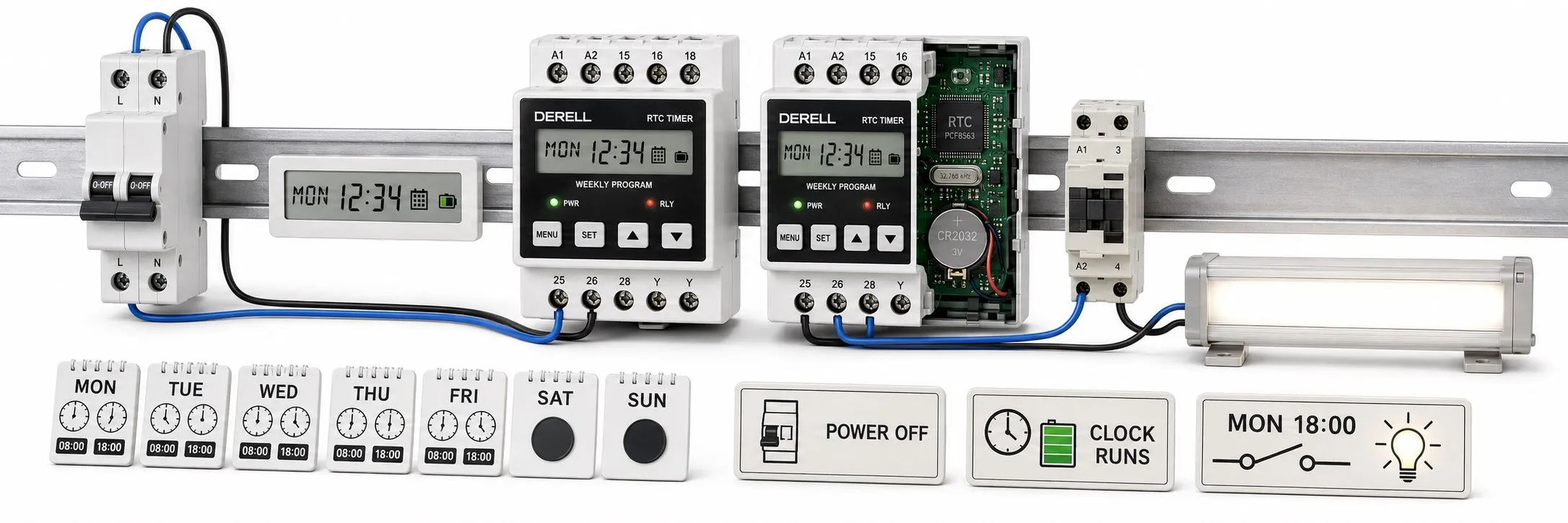
When ventilation must run during weekday business hours, a sign must light up each evening or an irrigation valve must open on selected days, the control depends on time of day and the calendar. An RTC time relay, commonly called a calendar time switch, compares its clock and date with a stored schedule and commands the relevant output on or off. A task that would otherwise require daily attention becomes part of a defined operating schedule.
RTC stands for Real-Time Clock. The clock circuit keeps hours, minutes, seconds and calendar information; a complete time switch adds program memory, comparison logic and an output stage. A bare RTC chip is not a device for switching a motor or lighting circuit. Here, “real time” refers to calendar time; it does not imply a guaranteed response time of the kind required in deterministic industrial control.
Elapsed-time delays and calendar schedules
An on-delay timer operates its output after a specified delay, such as 30 seconds following a trigger. An off-delay timer keeps its output active for a set period after the relevant trigger condition is removed. An RTC schedule asks “What day and time is it?” rather than “How long has it been since the trigger?” A Monday 08:00 command depends on the device having the correct weekday and clock settings.
A digital display alone does not establish that a device supports calendar schedules: a digital timer may simply measure elapsed time. Conversely, mechanical time switches can also provide daily or weekly schedules. Start with the timing function the application needs, then consider the display and programming interface.
Daily, weekly, annual and astronomical schedules
A daily schedule repeats the same switching times every day. A weekly schedule can treat Monday differently from Saturday. Models with annual or holiday scheduling can apply exceptions on specified dates. Channel count, memory capacity, holiday functions and exception priorities vary by model; an RTC clock does not automatically provide all these features.
An astronomical schedule calculates sunrise or sunset from the date and location. Supported models may also allow an offset before or after that calculated time. Outdoor lighting switched on at a fixed 18:00 does not follow sunset as the seasons change. Having an RTC does not by itself give a device astronomical capability; that function must be specified separately.
Example: working hours with a lunch break
Suppose a building needs ventilation enabled from Monday to Friday during 08:00–12:00 and 13:00–18:00. This can be entered as four switching events: on at 08:00, off at 12:00, on at 13:00 and off at 18:00, with weekends left off. Some devices count on and off commands as separate memory entries; others present a complete time window as one program. Check what a quoted capacity such as “20 programs” actually allows.
Entering an 08:00–18:00 operating window and then adding a 12:00–13:00 off period does not produce the same result on every device. Overlapping-program priority depends on the model. Two separate operating windows, or a documented exception function, make the intended schedule clearer. Overnight operation also needs the correct weekday: a Friday 22:00 start followed by a morning stop means Saturday 06:00. The way an overnight window is entered varies between interfaces.
What happens during a power failure?
Retaining the program, keeping the clock running and supplying the load are separate functions. Nonvolatile memory may preserve the schedule, while a battery or supercapacitor keeps the clock running for a specified period. That small backup component is not an uninterruptible power supply for the connected motor or lamp. Clock-reserve duration and any maintenance requirements must be checked in the product data.
The contact state during a supply failure depends on the output hardware. Recovery behaviour matters too: if power returns at 14:30, check whether the device recalculates the output state for the current operating window. Do not assume that missed switching events will be replayed. Confirm clock retention, program retention and output behaviour after power restoration during commissioning.
Editor’s note: “Battery backed” often refers to the clock. The display may go dark while the clock continues to run, and a stored program does not mean that the load remains powered. Read the specifications for clock reserve, program memory and output supply requirements separately.
Clock accuracy and switching resolution
Clock drift and the minimum programmable interval describe different things. A display showing seconds may still accept switching times only in one-minute steps. Quartz behaviour changes with temperature and ageing, which can affect timekeeping. For equipment expected to run for long periods without adjustment, check the accuracy specification and any supported method of time synchronisation.
Being able to transfer a schedule from a phone or computer does not mean that the clock stays synchronised automatically. Network time updates or an external time receiver are available only where the specific model supports them. Treat remote programming and clock synchronisation as separate capabilities.
Connections and load selection
The device’s supply voltage is separate from the voltage and current its output contacts can switch. A volt-free contact does not generate a supply for the load. A rating such as 16 A for a resistive load must not automatically be applied to a motor, contactor coil or LED driver. Check inrush current, load type and AC/DC switching ratings.
Where the load requires it, the time switch can control the coil of a suitable contactor, which carries the load current. The timer’s suitability for switching that coil still needs checking. A contactor does not replace overcurrent protection or the machine’s safety circuit. Connections and protective devices must follow the terminal diagram and the electrical requirements of the application.
Where RTC scheduling is useful
For lighting, a schedule can define business hours, a night-time off period or, with a suitable model, sunset-based switching. In heating and ventilation, the time switch can provide an operating permission while a separate controller regulates temperature or pressure. In irrigation, a scheduled start does not account for rain or soil moisture unless additional feedback is provided. A calendar schedule does not replace measurement of physical conditions.
In an industrial system, a calendar schedule can provide an operating permission to a PLC, while an HMI manages shift and holiday settings. If several devices follow the same timetable, their clocks must be checked for consistency. Machine start conditions and safety interlocks remain essential: reaching a scheduled on-time is not, by itself, a safe-start condition. For energy management, scheduling aims to reduce unnecessary running hours; consumption measurements establish the actual saving.
Commissioning and fault finding
Start with the date, weekday, clock and, where applicable, time zone. Check that the daylight-saving rule matches the installation’s location. Then verify the selected channel, enabled programs, holiday exceptions and automatic operating mode. A permanent manual-on or manual-off override can prevent an otherwise correct program from producing the expected result.
For an initial test, enter an on event and an off event a short time ahead, then observe both the output indication and the actual load. Check overnight operation and recovery after a power interruption. If switching occurs at the wrong time, inspect the clock and overlapping programs first. If it does not occur at all, check manual overrides, supply, contact wiring and the load circuit. Verify the displayed output state and actual load operation separately.
Related topics
Timing fundamentals
How time relays work, their main components, the difference between a time relay and a timer and the types of time relays help explain which function an application requires.
Different scheduling requirements
Programmable time relays and multifunction time relays offer useful comparisons between timing functions. See flasher time relays for repeating on/off cycles and calendar time switches for calendar-based products.
Selection, installation and troubleshooting
Consider time relay selection and installation, program and timing settings, building a timing circuit and fault diagnosis together when commissioning a system. For product comparisons, visit time relay types and prices.
Control, monitoring and energy management
The difference between a relay and a contactor and the section on fuses provide background on the load circuit. Explore smart relay FAQs for additional logic, the relationship between PLCs and SCADA for central monitoring, and energy saving for the connection between operating hours and consumption.
Sources
Microchip: RTC operation, clock accuracy and backup
Theben: Weekly schedules, switching intervals and load ratings
Theben: An example of annual and astronomical scheduling
Finder: Choosing daily, weekly and astronomical time switches
Finder: Series 12 technical data, power supply and clock reserve
Schneider Electric: Time switches, programming and selection criteria