
Toshiba H7 User manual
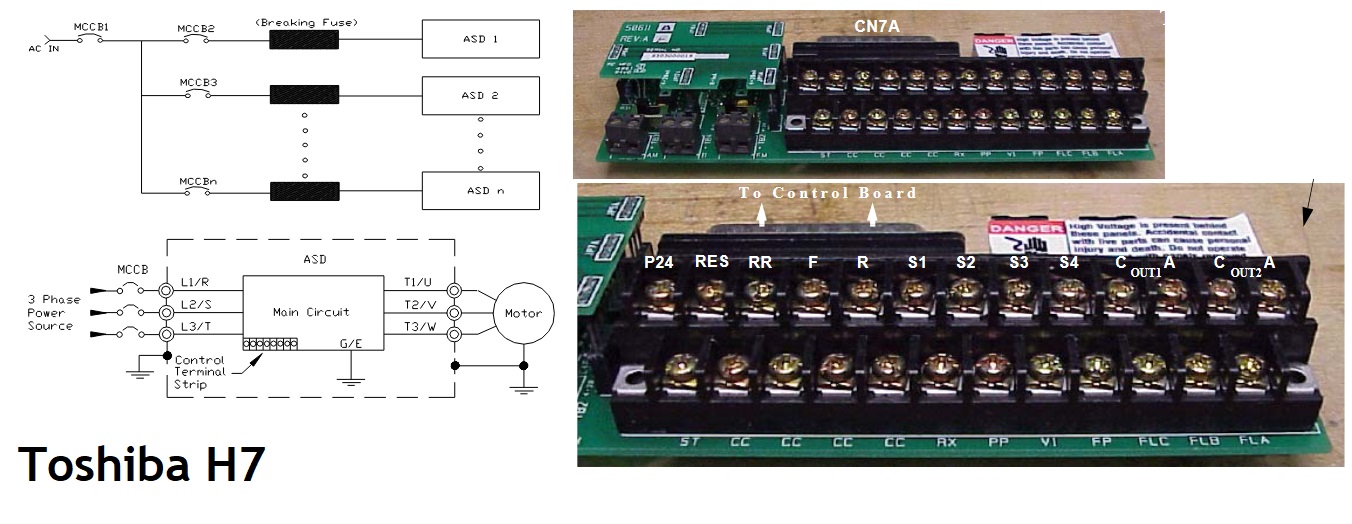
H7 ASD Control
The Control PCB (Part Number 56000) acts as the primary control source for the H7 ASD.
It receives inputs from the Control Terminal Strip PCB, an Option Card,
RS232/RS485 Communications, or the Electronic Operator Interface (EOI).
This
Control PCB has been upgraded to support two new functions: Multiple
Protocol Communications and the ability to communicate in either half-
or full-duplex modes. The optional multiple-protocol communications
interface, the ASD-NANOCOM, allows the Control PCB to be configured for the type of communications protocol
being received and respond appropriately to the sending device. The
ASD-NANOCOM connects to the J4 and J5 connectors, and a jumper PCB (Part
Number 55365) is required at the J4 connector if the ASD-NANOCOM is not
used.
The ASD-NANOCOM must
be set up to support the desired communications protocol via the
Program menu's Communication Setting Parameters. For a complete listing
of the setup requirements, consult the ASD-NANOCOM User’s Manual (Part
Number 10572-1.000-000).
Half or full-duplex communications are available when using RS232/RS485 communications.
The jumpers at the JP1 and JP2 connectors can be moved to facilitate
either half- or full-duplex operation. If no jumpers are used, the
system will operate in full-duplex mode.
Terminal Descriptions:
ST: Default setting is Standby mode controller. Must be connected to CC for normal operation.
RES: Default setting is system Reset. Momentarily connecting to CC resets the ASD and any fault indications.
F: Default setting is Forward Run. Connecting to CC runs the motor in the forward direction.
R: Default setting is Reverse Run. Connecting to CC runs the motor in the reverse direction.
S1 - S3: Default settings are Preset Speeds #1 to #3. These terminals can run the motor at preset speeds when activated.
S4: Default setting is Emergency Off. Removes power from the ASD output and may apply a supplemental braking system.
RR: Default
function is Frequency Mode #1 setting. Accepts a 0 – 10 VDC input
signal that controls the function assigned to this terminal.
RX: Accepts a ±10 VDC input signal that controls the function assigned to this terminal.
II: Receives a 4 – 20 mA input signal that controls a 0 – 80 Hz output.
VI: Receives a 0 – 10 VDC input signal that controls a 0 – 80 Hz output.
P24: Provides a +24 VDC @ 50 mA power supply for customer use.
PP: Provides a 10 VDC output that can be divided using a potentiometer for manual control of the RR programmed function.
OUT1 and OUT2: Default
settings are Output Low Speed indicator and ACC/DEC Complete indicator,
respectively. These terminals can be programmed to signal external
equipment or activate the brake.
FP: Outputs a series of pulses at a rate that is a function of the output frequency of the ASD.
AM and FM:
Produce output currents that are proportional to the output frequency
of the ASD or the magnitude of the function assigned to these terminals.
FLC, FLB, and FLA: Part
of a single-pole double-throw (relay) switch, these contacts can be
programmed to switch between FLB and FLA based on user-defined
conditions.
CC: Control common (Do Not connect to Earth Ground).
For
further information on terminal assignments, default setting changes,
and programmable terminal functions, refer to the H7 ASD Operation
Manual.
- Toshiba H7 applications workbook 2383.pdf
- Toshiba H7 asd operation manual 46.pdf
- Toshiba H7 series keypad extender cable manual 2103.pdf
- Toshiba H7 series manual speed search option pcb 2104.pdf
- Toshiba H7 series serial communications user manual 2106.pdf
- Toshiba H7 series simulator installation manual 2107.pdf
- Toshiba H7 series terminal isolator installation manual 2108.pdf
+ Toshiba H7 VFD Fault Codes >>
+ Toshiba H7 VFD Fault Codes 2 >>
+ Toshiba H7 VFD User Manuals
+ Toshiba H7 VFD
+ Used VFD Models
+ VFD Main page -
 -
-