
Yaskawa P7 Fault codes
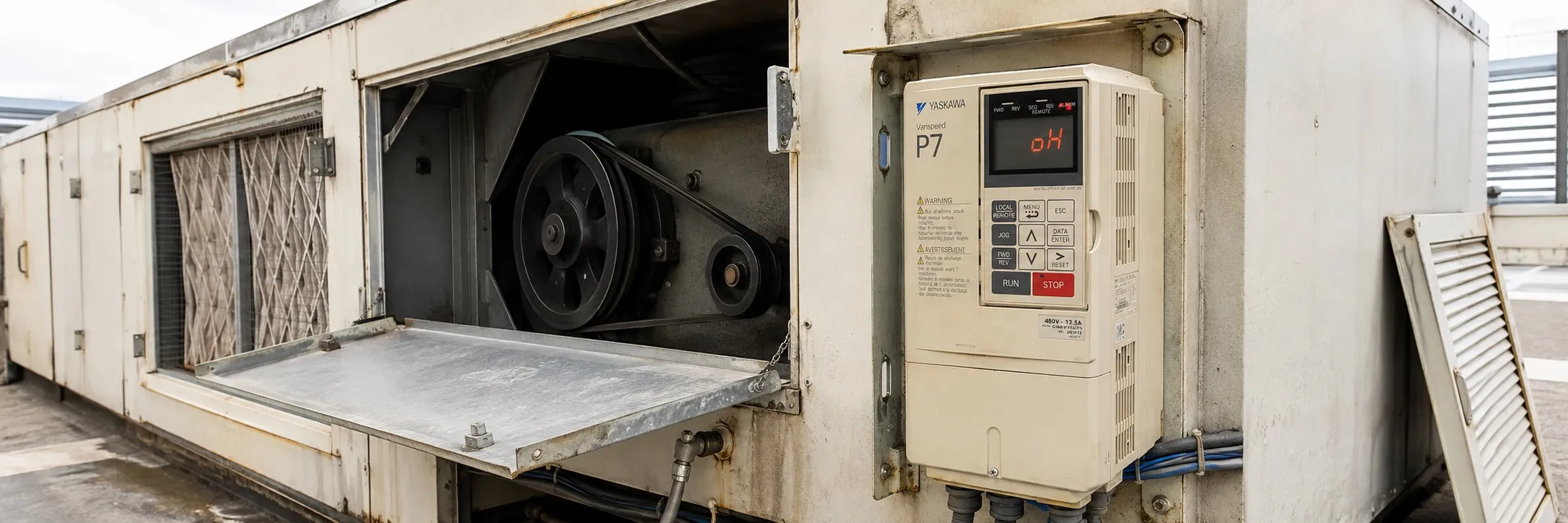
Fault Detection
When the drive detects a fault, the fault information is displayed on the digital operator, the fault contact closes, and the motor coasts to a stop until stopped. (However, a fault with a selectable stop method will operate according to the selected stop method.)
If a fault occurs, investigate the cause and take appropriate action according to the table below.
To restart, reset the fault with any of the following procedures:
+ Turn ON the fault reset signal.
+ Set "14: Fault Reset" to the multifunction digital input (H1-01 - H1-05).
+ Press the RESET button on the digital operator.
+ Turn off the drive input power once and then turn it back on.
WARNING
The Run Command (Start Command) must be removed before resetting the fault. Resetting the fault by turning off the power and then reapplying it while the Run Command is applied can cause the Drive to start unexpectedly. Therefore, ensure that all personnel are away from the Drive, motor, and machine before resetting the Drive.
BUS Option Communication Error
+ The connection was interrupted after initial communication was established. The connection is broken, the host device stopped communication. Check all connections, verify all user-side software configurations.
CE Memobus Communication Error
+ Control data was not received correctly for two seconds. The connection is broken, the host device stopped communication. Check all connections, verify all user-side software configurations.
CPF00 Operator Communication Error 1
+ Communication between the drive and digital operator could not be established within 5 seconds after power is supplied. Digital operator cable not securely connected, digital operator faulty, control board faulty. Remove and then reinsert the digital operator once. External RAM of the CPU is faulty. Control circuit is damaged. Power cycle the drive ON and OFF. Replace the drive.
CPF01 Operator Communication Error 2
+ A communication error occurred for 2 seconds or longer after communication with the digital operator started. Digital operator cable not securely connected, digital operator faulty, control board faulty. Remove and then reinsert the digital operator once. Power cycle the drive ON and OFF. Replace the drive.
CPF02 Base Block Circuit Error
+ Base block circuit error at power-on. Gate array hardware failure at power-on. Perform a factory initialization. Power cycle the drive ON and OFF. Replace the control board.
CPF03 EEPROM Error
+ EEPROM error, checksum not valid. Noise or fluctuation at control circuit input terminals. Perform a factory initialization. Power cycle the drive ON and OFF. Replace the control board.
CPF04 Internal A/D Error
+ CPU Internal A/D Converter Error
+ Noise or fluctuation at control circuit input terminals
+ Perform a factory initialization
+ Power cycle the drive ON and OFF
+ Replace the control board
CPF05 External A/D Error
+ CPU External A/D Converter Error
+ Noise or fluctuation at control circuit input terminals
+ Perform a factory initialization
+ Power cycle the drive ON and OFF
+ Replace the control board
CPF07 RAM Error
+ ASIC Internal RAM Error
+ Power cycle the drive ON and OFF
+ Control circuit damage
+ Replace the drive
CPF08 WAT Error
+ Watchdog Timer Error
+ Power cycle the drive ON and OFF
+ Control circuit damage
+ Replace the drive
CPF09 CPU Error
+ CPU-ASIC Mutual Diagnosis Error
+ Power cycle the drive ON and OFF
+ Control circuit damage
+ Replace the drive
CPF10 ASIC Error
+ ASIC Version Error
+ Control circuit damage
+ Replace the drive
CPF20 Option A/D Error
+ Option Card Error
+ Option card connector connection error
+ Remove all inputs from the option card
+ Option card A/D converter error
+ Perform a factory initialization
+ Power cycle the drive ON and OFF
+ Replace the option card
+ Replace the control board
CPF21 Option CPU Down
+ Communication Option Card Self-diagnosis Error
+ Noise or fluctuation on communication line, faulty option card
+ Perform a factory initialization
+ Power cycle the drive ON and OFF
+ Replace the option card
+ Replace the control board
CPF22 Option Type Error
+ Communication Option Card Code Number Error
+ An unrecognized option card is connected to the control board
+ Remove any option card
+ Power cycle the drive ON and OFF
+ Perform a factory initialization
+ Replace the option card
+ Replace the control board
CPF23 Option DPRAM Error
+ Communication Option Card Connection Error
+ An option card is not properly connected to the control board or an option card not made for the Drive is connected to the control board
+ Turn off the power to the Drive
+ Reconnect the option card once more
+ Perform a factory initialization
+ Power cycle the drive ON and OFF
+ Replace the option card
+ Replace the control board