
What is an Ethernet card and what does it do?
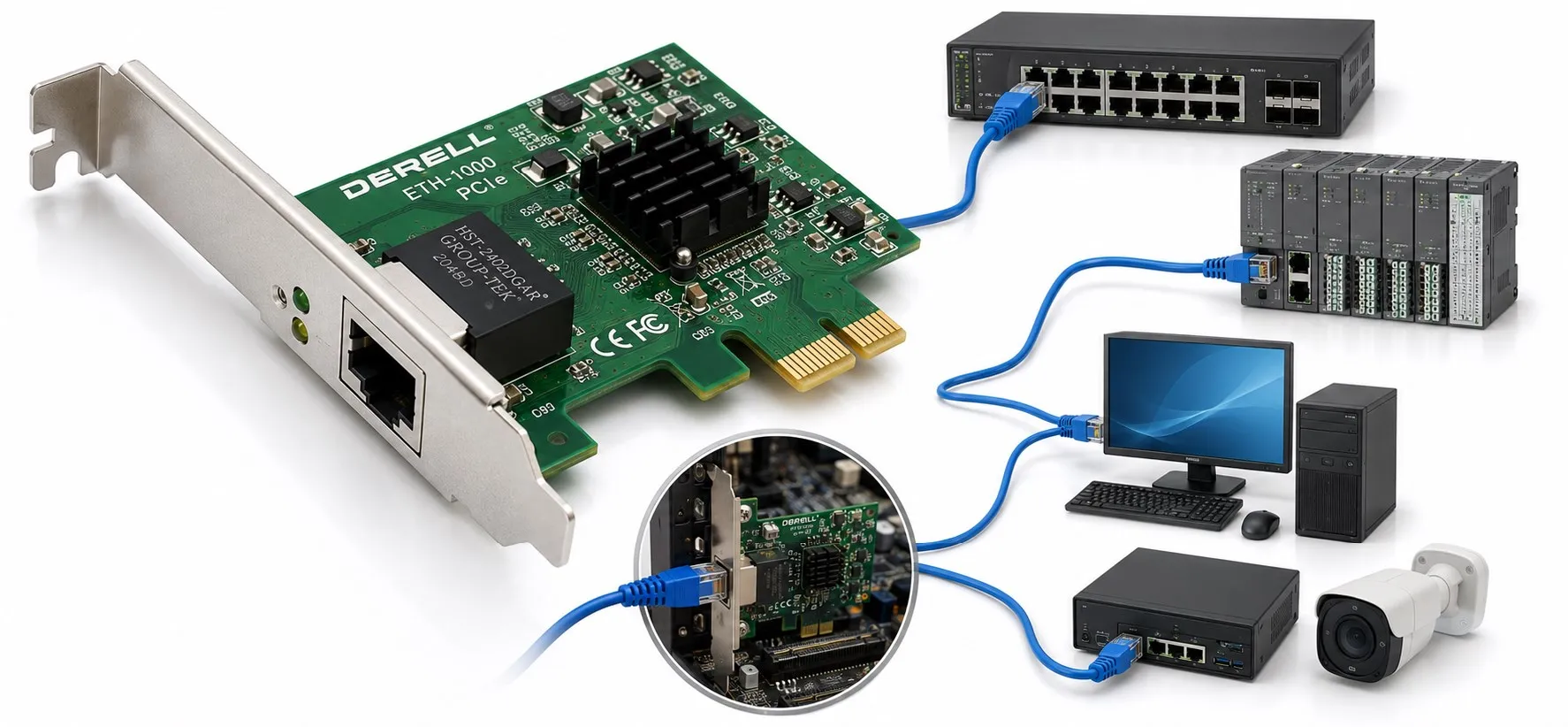
An Ethernet card is the network interface that connects a host device to an Ethernet network. You will also see the terms Network Interface Controller / Card (NIC), LAN adapter and Ethernet adapter. The word “card” is no longer literal in many products: the interface may be a plug-in PCIe card, but it may also be integrated directly into a motherboard, industrial PC, PLC, HMI or other embedded device. The important function is not the board shape; it is the combination of MAC/PHY hardware, host data movement and driver or firmware control that forms the Ethernet interface. [1]
Thinking of a NIC as nothing more than “the part with the RJ45 socket” misses most of its job. A modern NIC may queue and buffer traffic, move data between host memory and the adapter, process Ethernet frames, drive the physical medium and expose diagnostics or hardware offloads to software. It does not, by itself, create the application behaviour of Modbus TCP, EtherNet/IP, PROFINET or EtherCAT. Ethernet hardware and the higher-level protocol stack are separate pieces.
What is inside an Ethernet interface?
The exact architecture depends on the controller, but most modern interfaces contain several of the following blocks. Intel's I210 is a useful concrete example: it combines a PCI Express host interface with an Ethernet MAC, integrated copper PHY, SerDes/SGMII options and multiple transmit/receive queues. That architecture shows why a NIC is much more than a connector. [2]
| Block | What it does | Why it matters in practice |
|---|---|---|
| Host interface | Moves data between the NIC and the CPU/memory subsystem. PC adapters commonly use PCIe; embedded designs may use other internal interfaces. | Determines how the Ethernet controller connects to the host and can limit host-side bandwidth. |
| DMA and descriptor rings | Allow packet data to move between host memory and the adapter without the CPU copying every byte directly. | Can affect CPU load, latency and drop behaviour under heavy traffic. |
| TX/RX queues and buffers | Temporarily hold frames waiting to be transmitted or processed after reception. | Queue depth and scheduling matter during bursts or high traffic loads. |
| MAC | Handles Layer-2 Ethernet frame transmission/reception, MAC addressing and frame integrity functions. | Frame counters, addressing and some VLAN/offload capabilities appear here. |
| PHY | Implements the physical signalling needed for the selected copper, fiber or other Ethernet medium. | Link rate, auto-negotiation, cable quality and physical link state depend heavily on the PHY. |
| Driver / firmware | Lets the operating system or real-time software configure the controller and retrieve status. | Compatibility, counters, offloads, interrupt behaviour and timing can all depend on it. |
Why “parallel data in, serial data out” is an outdated explanation
Older introductory material sometimes describes a network card as a device that converts a computer's parallel data into serial network data. That can be a useful historical simplification, but it is not a good description of modern hardware. Many current Ethernet controllers connect to the host over PCI Express, which is itself a serial interface. Intel's I210, for example, uses a PCIe x1 host interface. [2]
A more accurate description is that the NIC takes network data from host memory through buffers and descriptors, processes it through the Ethernet MAC and PHY, and transmits it on the physical medium. Receive traffic follows the reverse direction. The real job is therefore about frame processing, memory access, queueing, MAC functions and physical signalling, not simply parallel-to-serial conversion.
How does a packet move through the NIC?
Imagine an HMI application communicating with a PLC over TCP/IP. The operating system network stack prepares the data. The driver associates the outgoing data with descriptors in a transmit queue. The NIC can fetch the data from host memory using DMA, process the Ethernet frame in the MAC, and pass it to the PHY for transmission on the line.
On reception, the PHY recovers the signal, the MAC processes the incoming Ethernet frame, and the NIC places the data into receive buffers for the driver and operating system. High-performance adapters may also perform checksum processing, segmentation or traffic distribution in hardware. Linux's Intel 800 Series driver documentation shows examples including checksum and UDP segmentation offload. [3]
MAC and PHY are not the same thing
The MAC handles the Layer-2 side of Ethernet frames. The PHY handles the physical signalling that carries those bits over the actual medium. Some controllers integrate MAC and PHY in one chip; other designs use an external PHY, SerDes path or pluggable optical transceiver.
This distinction is useful when troubleshooting. If the driver sees the device but there is no link, the investigation often moves toward the cable, connector, peer port, PHY or negotiation. If the link is up but frame errors increase, inspect physical media and port counters. If Layer 1 and Layer 2 look healthy while the application still fails, the fault may be in IP configuration, VLANs or the higher-level protocol. See What is the Ethernet protocol? and How does Ethernet work? for the layer model.
What does the NIC do during auto-negotiation?
On copper Ethernet links, the PHYs at each end can negotiate a common operating mode according to the Ethernet technology involved. Speed and duplex capabilities are part of that process where applicable. In a modern network, the usual goal is a correctly negotiated full-duplex link on both ends.
A reported “1.0 Gb/s” link does not mean that the application is transferring one gigabit of useful payload every second. It first describes the physical link rate. Real throughput depends on frame overhead, higher-layer protocols, CPU load, storage, switch queues and the application itself. That difference is covered in Ethernet speeds. Cisco's Ethernet negotiation guidance also documents why duplex mismatches can produce errors and poor performance. [6]
A MAC address is not the NIC's immutable serial number
An Ethernet interface uses one or more MAC addresses for Layer-2 communication, but the MAC should not be treated as an unchangeable hardware serial number. An adapter may have a manufacturer-assigned address, while locally administered addresses, virtual interfaces and software-controlled MAC addresses also exist.
That means a MAC address is not sufficient proof of physical-device identity and is not an authentication mechanism by itself. See What is an Ethernet or MAC address? and Ethernet network security for those topics.
Why the driver matters as much as the hardware
A NIC's hardware features are only useful if the operating system or real-time environment has a suitable driver. Drivers configure link behaviour, TX/RX queues, interrupts, checksum and segmentation offloads, RSS and hardware statistics. Linux kernel documentation for modern Intel Ethernet controllers demonstrates how many of these features are exposed through the driver. [3]
So “the card supports 1 Gb/s” is not enough to guarantee a healthy system. An outdated driver, incompatible firmware, unsuitable power-management setting or unexpected offload configuration can affect real behaviour. Intel's June 2026 Ethernet controller release notes are a current example of how driver and operating-system support are tracked separately for different adapter families. [7]
What are NIC offloads, and should they always be enabled?
Offload means handing selected network-processing work from the CPU or operating system to NIC hardware. Checksum offload, TCP Segmentation Offload (TSO), UDP Segmentation Offload (USO) and Receive Side Scaling (RSS) are common examples. The goal is often to reduce CPU work and increase throughput. Linux kernel documentation explains how segmentation-offload mechanisms divide responsibilities between software and hardware. [4]
For industrial control, however, “enable every offload for best performance” is not a universal rule. Some features that improve throughput can change interrupt or batching behaviour and therefore affect latency characteristics. For a real-time or low-jitter workload, use the NIC, driver and protocol vendor recommendations and verify the result by measurement. Packet capture behaviour can also look different when offloads are active.
What do RSS and multiple queues do?
A fast adapter can overload a single CPU core if all receive processing lands in one place. Receive Side Scaling (RSS) allows supported NICs and drivers to distribute flows across multiple receive queues and processor cores. The Linux kernel scaling documentation describes RSS as a hardware mechanism based on multiple receive queues. [5]
This may be almost invisible on a simple PLC programming laptop, but it can matter on a busy SCADA server, historian or multi-port industrial PC. Queue count alone, however, is not a measure of network quality for a small control system.
What is the difference between a NIC and a switch?
A NIC is the network interface of an endpoint. A switch forwards Ethernet frames between multiple ports. The NIC sends and receives traffic for its host; the switch learns MAC addresses and forwards frames through the network. See Ethernet switch vs. hub for the forwarding side.
A device with two Ethernet ports is not automatically “a switch.” The ports may represent two independent NICs, an embedded two-port switch, or a special topology for an industrial real-time Ethernet system. The architecture has to be confirmed from the device documentation.
Is the Ethernet port in a PLC or HMI also a NIC?
Functionally, yes. The Ethernet interface inside a PLC or HMI also provides MAC/PHY and driver or firmware functions. But the software model is not necessarily the same as a general-purpose PC NIC. The automation device can use only the protocols and features implemented by its manufacturer.
For example, a 100/1000BASE-T port does not prove support for EtherNet/IP, PROFINET or EtherCAT. Physical Ethernet capability and application-protocol support must be checked separately. Likewise, a generic PC NIC does not automatically make the PC a high-performance EtherCAT MainDevice; a suitable hardware/driver path and real-time software stack are required. See EtherCAT programming and tools and EtherCAT real-time performance for that distinction.
What should you look for when choosing an industrial Ethernet adapter?
| Use case | Priority | Why it matters |
|---|---|---|
| PLC/HMI engineering laptop | Reliable 1G RJ45, stable driver, known-good USB/PCIe adapter | For programming and diagnostics, compatibility is often more important than extreme raw bandwidth. |
| SCADA / historian server | 1G/2.5G/10G as needed, multiple queues, RSS, mature drivers | Many connections and high data volume can increase host processing load. |
| EtherCAT MainDevice PC | NIC/driver path validated by the EtherCAT software and suitable timing behaviour | An RJ45 connector and a fast link rate do not prove real-time compatibility. |
| Long distance / high EMI | Appropriate SFP/SFP+ or fiber interface and transceiver compatibility | Fiber can help with electrical isolation and EMI immunity; distance depends on the selected PHY/optic. |
| Industrial PC inside machinery | Temperature range, lifecycle, EMC, driver support, required PTP/TSN features | The environmental and lifecycle requirements may be very different from a desktop adapter. |
The physical medium and NIC must be selected together. The supported PHY, Ethernet cable type and permitted cable length all have to match. A NIC labelled 10G can only establish a 10G link if the peer port, medium and transceiver support the same mode.
A NIC and PoE are not the same thing
A normal Ethernet NIC is intended for data communication and is usually not a Power Sourcing Equipment (PSE) device that injects PoE power onto the cable. PoE cameras, access points and other powered devices are typically supplied by a PoE switch, injector or purpose-built PSE hardware. Special adapters may exist, so always check the product datasheet. See What is Power over Ethernet (PoE)? for power classes and budgeting.
The link LED is on but communication still fails — how do you test the NIC?
Instead of immediately deciding that “the card is bad,” work through the layers:
1. Does the operating system or device firmware detect the interface?
2. Is the driver/firmware correct, and are there device errors?
3. Is link up, and what speed/duplex was negotiated?
4. Are RX/TX errors, CRC/FCS errors, drops or queue counters increasing?
5. Does replacing the cable or switch port change the behaviour?
6. Could VLAN configuration, MAC filtering or port security be blocking traffic?
7. For IP-based communication, are IP address, subnet and gateway correct?
8. If the physical link is healthy, do both devices actually support the same application protocol?
This prevents the common mistake of treating “link up” as proof that the complete network is working. Link is an important physical-layer indication; Ethernet data transmission and application communication continue above it.
In one paragraph
An Ethernet card or NIC is the hardware-and-driver interface between a host and an Ethernet network. A modern NIC can include a host bus interface, DMA, TX/RX queues, MAC, PHY, buffers, drivers and advanced offload or timing functions. Its job is not simply “parallel-to-serial conversion.” Link rate is not the same thing as application performance, and the presence of an RJ45 port does not prove EtherNet/IP, PROFINET or EtherCAT compatibility. Select a NIC by considering link technology, physical medium, driver support, operating system and the actual industrial application together.
Related Ethernet guides
What is Ethernet? • How does Ethernet work? • Ethernet protocol • Ethernet frame structure • MAC address • Switch vs. hub • Protocols over Ethernet • Ethernet speeds • Gigabit Ethernet • Ethernet cable types • Maximum cable length • PoE • Ethernet security • Advantages and disadvantages