
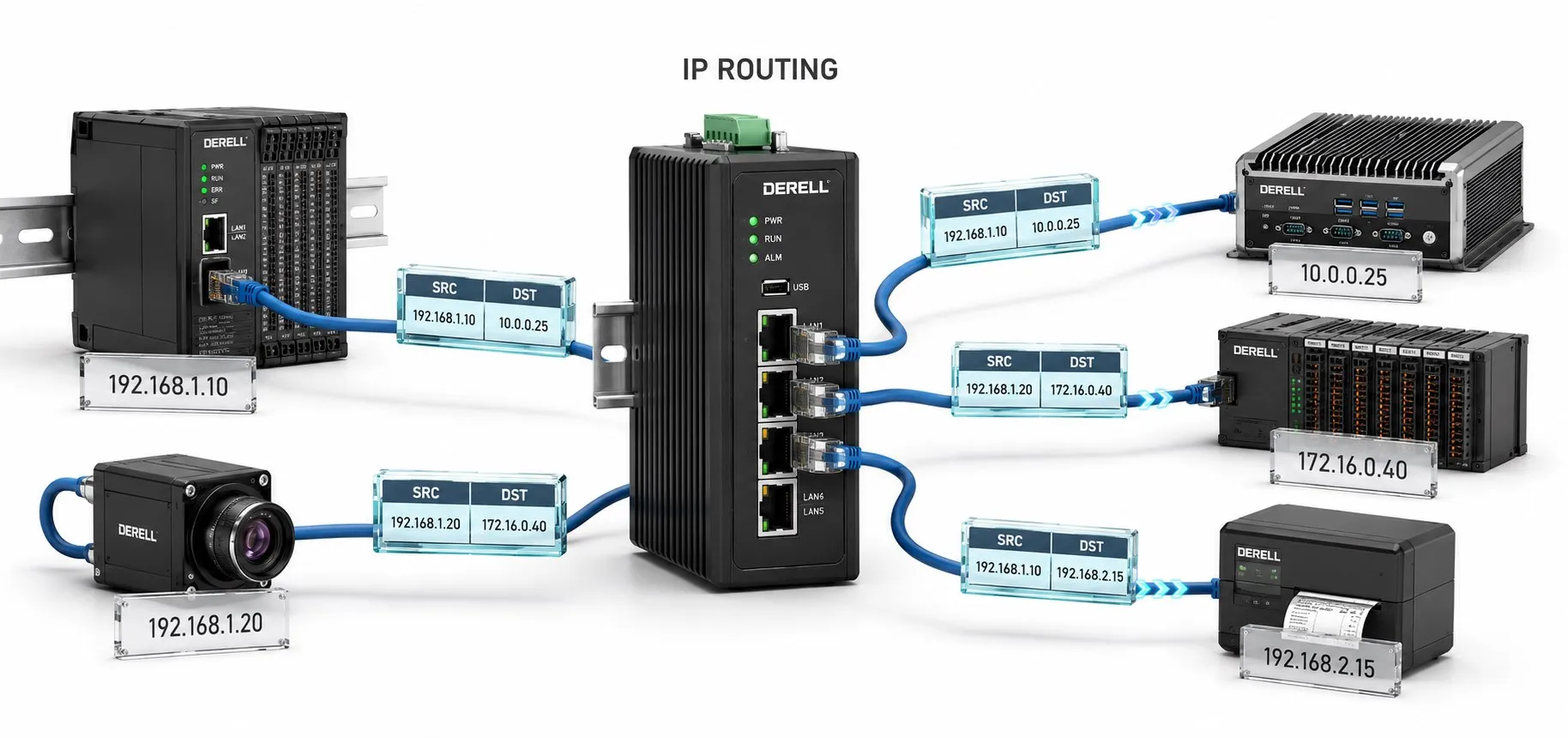
What does Internet Protocol actually do?
Internet Protocol, or IP, provides addressing and packet-delivery rules for communication across networks. The same protocol used on the internet can connect a PLC, an industrial PC and a SCADA server inside a plant. An IP network does not need an internet connection.
An IP packet has a header, including source and destination addresses, and a payload. An IP address belongs to the network's logical addressing scheme; it is not a GPS location. A device may have several interfaces and several IP addresses. The term is unrelated to enclosure ratings such as IP20 protection.
Delivery service is not a delivery guarantee
IP does not guarantee arrival, ordering or a delivery deadline. Packets can be lost, delayed, duplicated or received out of sequence. The IP layer itself does not provide end-to-end acknowledgements or retransmission of lost data. Getting a packet to a host and getting an application to act correctly are separate problems.
This is where TCP and UDP enter the picture. TCP recovers from losses to provide an ordered byte stream while the connection remains viable; a connection can still fail. UDP over IP carries datagrams without adding delivery or ordering guarantees. A TCP acknowledgement is not proof that a PLC executed a command. That requires application-level responses and status information.
Keep IP addresses, MAC addresses and ports separate
Ethernet carries frames over a local link. IP uses that link to deliver packets, including packets headed for other networks. A MAC address identifies an interface for Ethernet delivery, while a TCP or UDP port identifies a transport endpoint used by an application. The IP address and transport port perform different jobs. A physical RJ45 socket is also distinct from a software port number.
A Layer 2 switch forwards Ethernet frames using MAC addresses. A router, or a Layer 3 switch performing routing, uses the destination IP address and a routing table to select a next hop. These functions work together during data transmission over Ethernet.
The subnet tells a host whether a destination is local
Consider a PLC configured as 192.168.10.20/24. The /24 means a 24-bit network prefix, equivalent to the IPv4 mask 255.255.255.0. In this example, 192.168.10.0 is the network address, 192.168.10.255 is the broadcast address, and ordinary host addresses run from 192.168.10.1 to 192.168.10.254. Other prefix lengths require different calculations.
A host at 192.168.10.50/24 is on the same subnet; 192.168.20.50/24 is on another subnet. Local traffic does not need to pass through the default gateway when the required local connectivity exists. A remote destination needs a suitable route; the default gateway is used when no more specific route applies. Comparing the first three decimal groups works for this /24 example, not for IPv4 addressing in general.
The next hop is not the final IP destination
Suppose the PLC is 192.168.10.20/24 and the SCADA server is 192.168.20.50/24. A router connects the two networks, using 192.168.10.1 and 192.168.20.1 on its interfaces. This example has no NAT and both networks are directly connected to the router. Local switches are omitted from the drawing.
The PLC puts 192.168.20.50 in the packet's destination IP field. However, the first Ethernet frame is addressed to the local gateway's MAC address. The router forwards the packet in a new Ethernet frame addressed to the SCADA interface. Sending a frame to the gateway does not replace the packet's final destination with the gateway's IP address. Routers reduce IPv4 TTL or IPv6 Hop Limit to prevent packets circulating indefinitely.
Ordinary destination-based forwarding selects the longest matching prefix; route sources, metrics and configured policies can also affect selection. IP therefore does not promise the shortest or fastest possible path across the entire network. Replies also require a valid return route and permitted traffic.
IPv4 and IPv6 addressing at a glance
| Property | IPv4 | IPv6 |
|---|---|---|
| Address length | 32 bits | 128 bits |
| Theoretical address space | 2³² = 4,294,967,296 addresses | 2¹²⁸ ≈ 3.4 × 10³⁸ addresses |
| Example notation | 192.168.10.20 | 2001:db8:10::20 Documentation example. |
| Written format | Four decimal groups, each from 0 to 255 | Eight 16-bit hexadecimal groups, with permitted zero compression |
These theoretical totals are not counts of addresses available for general public assignment: reserved and special-purpose ranges exist. In IPv6 notation, :: compresses one or more consecutive zero groups and can appear only once in an address. IPv4 and IPv6 use different packet formats; interoperability may require dual stack, translation or another transition arrangement.
Private addresses, NAT and automatic configuration
The IPv4 ranges 10.0.0.0/8, 172.16.0.0/12 and 192.168.0.0/16 are reserved for private networks. Another plant can reuse the same private addresses; they are not directly routed across the public internet. NAT translates addresses and, in some forms, transport ports. Translation and firewall filtering are different functions.
DHCP supplies addresses and other network settings automatically. Whether a machine uses static addressing or DHCP reservations, maintain an address plan and prevent manually assigned addresses from conflicting with the allocation pool. DNS resolves names into address records: if access by IP works but access by name fails, investigate name resolution separately. IPv6 SLAAC supports automatic address configuration under suitable network conditions; automation does not eliminate the need for planning.
Why can ping work while the PLC connection fails?
A ping reply demonstrates a successful ICMP Echo exchange. It does not establish that the required TCP or UDP port is available, that the correct application protocol is running, or that a measurement is fresh. Missing ping replies do not by themselves prove that a device is powered off; ICMP may be filtered.
For Modbus TCP and EtherNet/IP, verify the protocol, port, device role and application settings as well as the address. Check the required EtherNet/IP ports separately. Likewise, do not assume that all cyclic PROFINET or EtherCAT traffic is ordinary TCP/IP communication. Protocols running over Ethernet can use different layers and mechanisms.
Start with cabling and Ethernet link requirements, then check addressing, masks, VLANs, duplicate addresses, routes and firewall rules. If problems appear with larger transfers, consider MTU and fragmentation. IPv4 sources or routers can fragment packets when permitted; IPv6 routers do not fragment packets, so any required fragmentation is performed by the source. Reassembling an IP packet is not the same as reliably reconstructing every application message.
Does IPv6 provide automatic security?
IPv6 does not automatically encrypt traffic or eliminate address spoofing. Protection such as IPsec or TLS needs appropriate configuration, authentication, key management and access policies. Evaluate network security protocols and industrial cybersecurity separately from the choice of IP version. IPv6 support on an IIoT device is not a reason to expose it directly to the internet.