
What is Bluetooth?
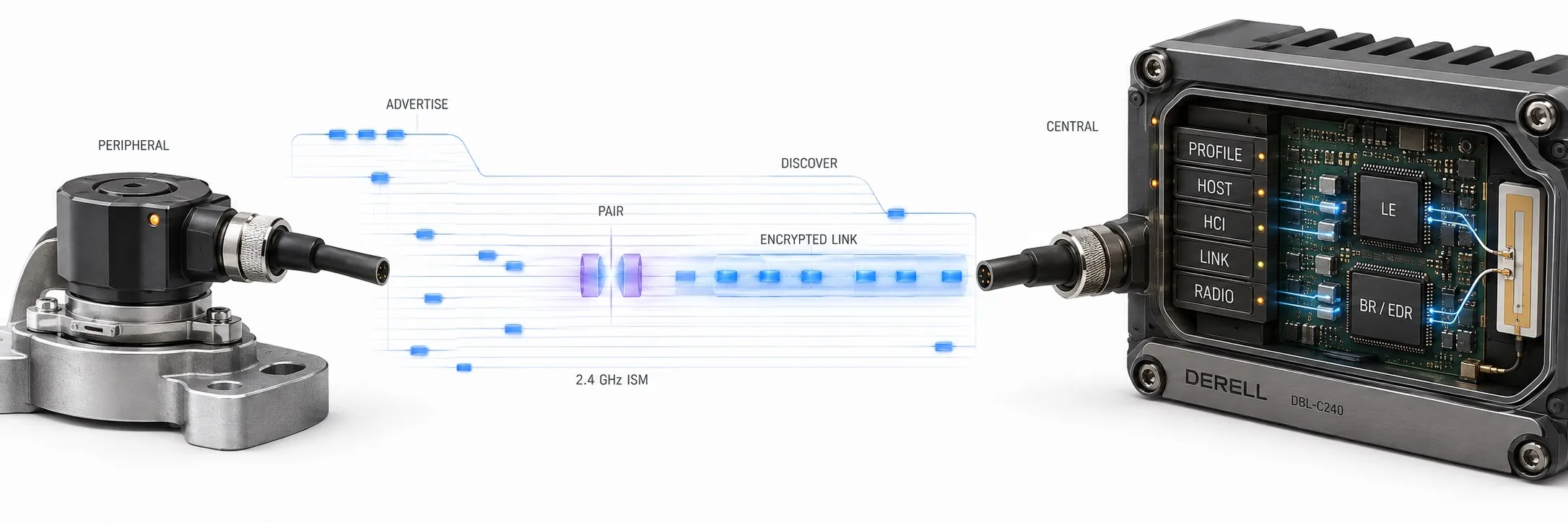
Wireless communication between nearby devices
Hello, Bluetooth is a wireless communication technology that allows phones, computers, headphones, keyboards and sensors to exchange data using radio waves. It operates in the 2.4 GHz ISM band and does not require a cable or Wi-Fi router for a direct device connection. Its technical specifications and product qualification process are developed and managed by the Bluetooth Special Interest Group, or Bluetooth SIG.
Two devices do not need an internet connection to communicate over Bluetooth. For example, a phone can send a locally stored audio file to headphones. If the content comes from an online service, however, that service requires internet access. Our guide to how Bluetooth technology works explains the communication process.
The difference between Bluetooth Classic and Bluetooth LE
Bluetooth Classic, also called BR/EDR, is used in traditional wireless headphones, in-car audio systems and various data connections. Bluetooth LE, or Low Energy, is a different communication system designed for low-energy operation and is common in battery-powered sensors, tracking devices and peripherals.
LE is not simply a lower-power setting of Bluetooth Classic. The two systems have different capabilities and communication methods; some products support both. Also, sharing the same Bluetooth version number does not mean that two products support identical profiles, services or every optional feature.
Editor's note: Pairing, connecting and using a particular function are different steps. A phone may discover a device and even connect to it, yet still be unable to obtain the required data without the appropriate profile, service or application. Check the supported functions as well as the Bluetooth logo when choosing devices.
How are devices discovered and paired?
Discovery, connection and security procedures vary between Bluetooth systems. LE devices can transmit advertising packets that nearby devices scan for. Some information can be received without establishing a connection or pairing. Therefore, pairing is not a prerequisite for every Bluetooth data exchange.
Pairing can establish security keys; storing them for future connections is called bonding. Whether users enter a PIN or compare displayed numbers depends on device capabilities and the selected method. For Bluetooth security, reject unfamiliar pairing requests, verify confirmation codes where applicable and keep device software updated. Being paired does not, by itself, meet every security requirement.
Why do range, speed and battery life vary?
Bluetooth range is not a fixed “10 metres.” Transmit power, receiver sensitivity, antenna design, radio mode and the operating environment all matter. Metal cabinets, walls, the human body and other transmissions in the same frequency band can affect the connection. Do not treat a manufacturer's open-field range as the range you will achieve inside a factory.
Assess speed in terms of the actual application data transferred; not all of the radio's raw data rate is available for user data. Power consumption and battery life depend on transmission frequency, data volume, scanning time, transmit power and the device's other circuits. Low Energy support does not guarantee the same battery life in every application.
Does it do the same job as Wi-Fi?
Wi-Fi is typically chosen for local network and internet access and larger data volumes. Bluetooth is widely used for connecting peripherals and exchanging data between devices with low power requirements. The difference between Bluetooth and Wi-Fi goes beyond speed: network structure, energy needs and application goals also differ. Both technologies can be included in the same product.
Is a Bluetooth address always fixed?
Bluetooth device addresses are 48 bits long, but devices do not necessarily keep transmitting the same unchanging address. Bluetooth LE supports public and random address types. Private addresses can change periodically to improve privacy. A changing address does not necessarily indicate a new or different device.
How should version numbers be interpreted?
The earlier statement that “Bluetooth 5.2 is the latest version” is outdated. Bluetooth SIG records checked on 15 October 2026 include the published Core Specification 6.3. However, a version number alone does not guarantee a particular range, audio capability or transfer speed. When comparing Bluetooth versions, check the features supported by both devices and their operating systems.
Everyday and industrial applications
Bluetooth applications range from computer peripherals to measuring instruments, condition monitoring and equipment configuration. For example, a battery-powered sensor can send readings to a nearby phone or gateway. Bluetooth support does not automatically provide direct communication with PLCs and automation systems; the data format, profile, service and any required gateway must be compatible.
When troubleshooting connectivity, first check that the device is discoverable, the correct application is being used, necessary permissions are granted and another connection has not exhausted the device's connection limit. Then reduce the distance, assess metal obstructions and use the manufacturer's current software.
Related topics: Bluetooth and health, remote control systems, remote control accessories.