
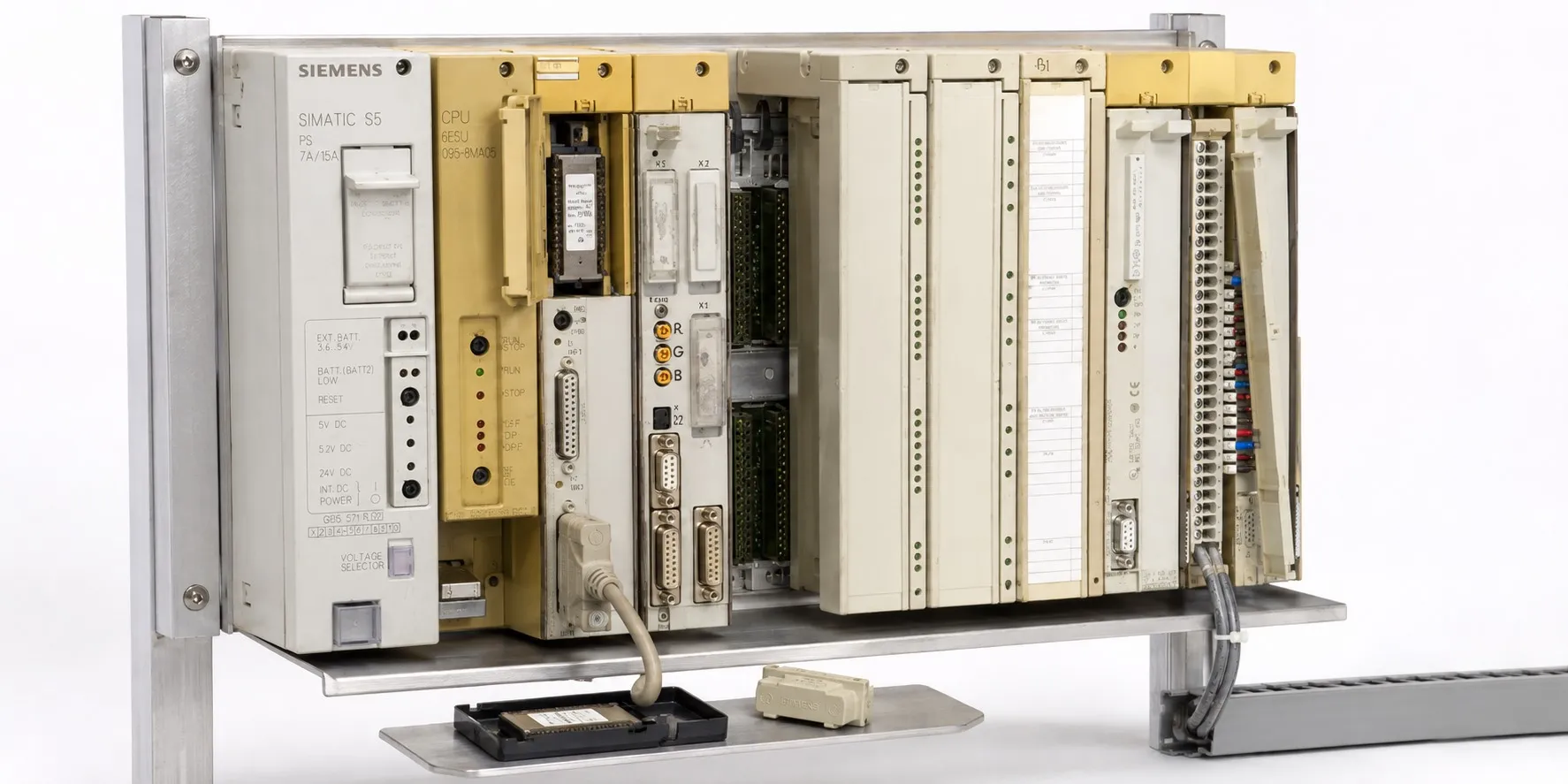
Simatic S5 CPU
Siemens SIMATIC S5 CPUs and System Selection
A Siemens SIMATIC S5 CPU executes the user program, evaluates input data and generates output commands in an S5 PLC system. S5-90U and S5-95U are compact controllers, while S5-100U, S5-115U, S5-135U and S5-155U use different CPU and system architectures. Selecting a replacement requires the complete 6ES5 order number, hardware version and existing application program.
This page helps identify an installed CPU family and find the relevant technical information. Review the CPU and central unit pages alongside the S5 module categories. Belonging to the same S5 family or fitting into a slot does not, by itself, establish compatibility.
S5-90U and S5-95U compact controllers
The SIMATIC S5-90U combines its CPU and onboard I/O in one housing. When examining a unit such as the 6ES5 090-8MA01, check its onboard channels, external module support, program memory and connections against the applicable manual. Its construction differs from a rack-mounted S5-115U CPU module.
The S5-95U is also a compact PLC. Order numbers such as 6ES5 095-8MA01 and 6ES5 095-8MA04 must be assessed individually. Onboard analog functions, counters and communication options depend on the specific version; one hardware specification should not be applied to every S5-95U.
S5-100U: CPU 100, CPU 102 and CPU 103
CPU 100, CPU 102 and CPU 103 belong to the S5-100U family. Program memory, instruction support, execution times and permitted peripheral capacity depend on the version. Before replacing a CPU, compare the instructions used by the existing program and the installed module configuration. Different CPU 103 order numbers also require their own specifications.
S5-115U: CPU 941, 942, 943, 944 and 945
The S5-115U is a modular controller family with CPU 941–945 processors. Consult the applicable Siemens manuals for CPU 941–944 and CPU 945 separately. Memory, instruction set, application functions and communication configuration determine replacement suitability. A higher CPU number does not guarantee that an existing program will run without changes.
S5-135U and S5-155U rack-based systems
S5-135U documentation covers processors including CPU 921, CPU 922, CPU 928 and CPU 928B. The CPU 922 word processor has a different role from CPU 928/928B processors. When selecting S5 racks and chassis, check the CPU slot, occupied space and complete central unit order number together.
For the S5-155U, assess CPU 946, CPU 947 and CPU 948 using the documentation for the relevant version. Certain S5-135U/155U configurations support multiprocessor operation; this is not a general feature of all S5 CPUs. Verify the CPU, rack and S5 power supply combination before deciding that a processor is suitable for a system.
STEP 5, programming connections and memory
A STEP 5 application must be considered alongside the CPU's supported instructions and memory structure. The use of EPROM, EEPROM or another type of S5 memory submodule depends on the CPU version. A memory module that physically fits is not evidence that it contains the correct program or data.
Select the correct S5 cables and connectors for programming. The standard S5-90U/S5-95U PG connection uses a 20 mA TTY current-loop interface. AS511 is a communication protocol; TTY is the physical interface. Do not treat this connection as a direct RS232 port; use an adapter providing the appropriate electrical conversion.
A programming port does not establish support for a required industrial network. Assess S5 communications processors for their protocols and data exchange functions, and S5 interface modules for their specific rack and expansion connections.
Which modules should be checked with the CPU?
Digital input modules receive sensor and contact signals, while digital output modules provide load control signals. Combined input/output modules can provide both functions on one board. Check signal voltage, output type, channel current and front connector as well as channel count.
For S5 analog modules, the measuring range, current/voltage selection, isolation, range submodule and program scaling must be considered together. Reading the same analog address after a CPU replacement does not automatically establish that the measured value is correct.
Machines using positioning modules or function modules may require dedicated function blocks and module parameters in addition to the CPU program. Having the main cyclic program alone may be insufficient to restore the special function.
Special S5 modules and additional and expansion components are part of the installed system. Record their order numbers and connection arrangements when selecting a spare CPU. Category names assist navigation; definitive system compatibility comes from the manufacturer's documentation.
Buying or selling a used S5 CPU
When assessing used Siemens automation equipment, provide the complete model number, quantity, working/faulty condition, a clear nameplate photograph and price information. To offer S5 CPUs or modules for sale, send these details to otomasyonavm@gmail.com. Sales require an invoice; used items are sold without returns. Equipment can be tested at the workshop. Availability and the scope of testing are agreed for the individual item.
Editor's Note
Start with a clear photograph of the nameplate. CPU 944 on the front cover is only part of the identification: read every character of the 6ES5 order number. The wrong suffix can make a working board an unsuitable spare for your machine.
If the machine is running, first obtain a verified program and data backup. Compare the stored project with the installed application. Removing a battery, clearing memory or performing an overall reset before verifying the backup can turn a manageable repair into a much larger job.
Look beyond the green RUN LED when buying a CPU. Assess the programming connection, startup from the memory module and behaviour with the actual application. A CPU that enters RUN with an empty program has not passed the same test as one running the machine's application correctly.
Do not condemn a CPU simply because it enters STOP. Follow its manual to distinguish power supply, battery, memory, missing-block and peripheral faults. A fault elsewhere in the system should not lead to replacing a healthy processor.
Label a stored spare with the installed CPU order number, memory module and program version. When it is needed months later, a spare prepared for an identified machine is far more useful than several unlabelled boards on a shelf.
OtomasyonAVM Resources and PDFs
Use the Siemens S5 overview and CPU/central unit technical pages to identify the complete order number, then select the manual for the correct controller family.
+ S5-90U PDF files and controller manuals
+ Shared PDF archive for other S5 families — S5-115 PDF files
An English archive page does not mean every linked PDF is in English. Check the document language, edition and covered CPU version individually.
Related Topics
+ S5 memory submodules and program storage
+ S5 programming cables and connectors
+ S5 analog input/output modules
Browse SIMATIC S5
+ Used Siemens automation equipment
Siemens and External References
+ Siemens — S5-90U/S5-95U System Manual (English)
+ Siemens — S5-100U CPU 100/102/103 System Manual (English)
+ Siemens — S5-115U CPU 941–944 Manual (English)
+ Siemens — S5-115U CPU 945 Manual (English)
+ Siemens — S5-135U/155U System Manual (English)
+ Siemens — Migration from S5 to S7-1500 (English)
+ Siemens — GRACIS Technical Description — AS511/TTY connection, section 3.1.9 (English)