
what is plc ladder diagram?
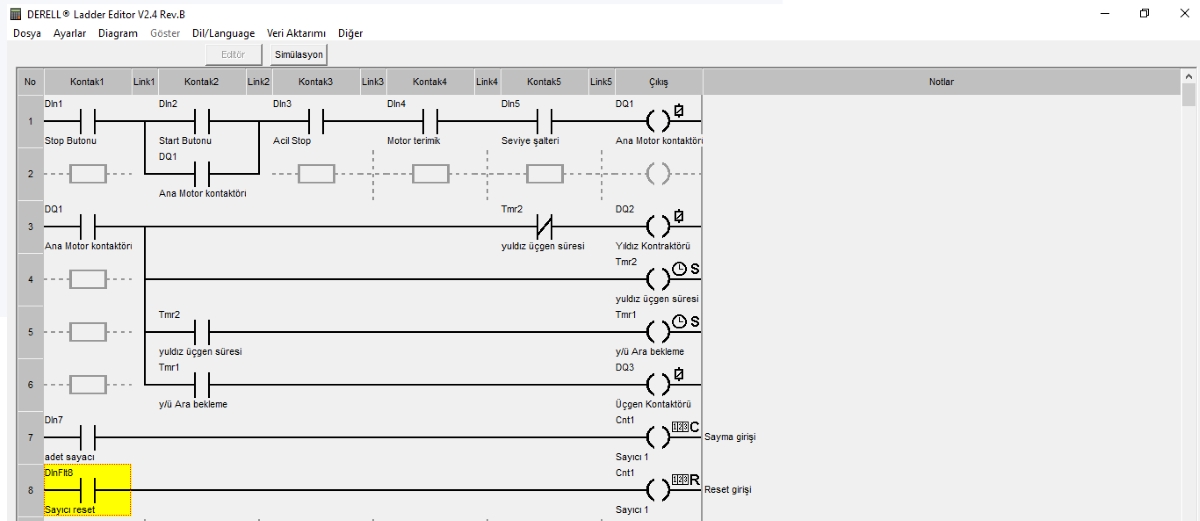
Ladder Diagram (LAD) is a programming language used to create programs for programmable logic controllers (PLCs). It is a graphical language that resembles the structure of electrical circuits and is commonly used to automate manufacturing processes or systems.
Ladder Diagram is used as a drawing tool to make programming easier. It represents the operation of electrical circuits and is often chosen during the design of PLC programs. A Ladder Diagram is a language that represents the workflow of a manufacturing process or control system, making it highly practical for engineers and technicians.
What is PLC diagram?
A PLC (Programmable Logic Controller) diagram is a
visual representation of a PLC system.
It shows the components, their connections, and the
input/output signals.
PLC diagrams are typically used to design, document, and understand
how a system operates.
PLC diagrams usually include the following components:
Input devices: Devices like sensors, switches, and push buttons that provide signals to the PLC.
Output devices: Devices such as motors, actuators, and lamps that respond to PLC signals.
PLC (CPU): The central processing unit of the system, responsible for executing the program and controlling all I/O signals.
Programming device: The tool used to create and edit the PLC program.
Communication devices: Hardware that enables the PLC to communicate with SCADA systems, computers, or other PLCs.
PLC diagrams may also include power supplies, relays, and other
electrical components as required by the application.
Learning Ladder logic is like opening the blueprint of automation. You can literally “see” how signals flow, which makes troubleshooting easier for technicians in the field.
One of the most important things is the correct usage of symbols. A wrongly drawn NO (Normally Open) or NC (Normally Closed) contact can change the meaning of the entire program.
PLC diagrams are not just for factories. From a simple motor control in a workshop to a fully automated production line, the same principles apply.
Simulation and testing of Ladder programs save both time and money. This is why many engineers run the logic on virtual PLC editors before touching real hardware.
Finally, always remember: AND, OR, and NOT are the backbone of Ladder logic. If you master these basics, the rest of the PLC world will feel much easier.
Your shopping cart is empty!