
Toshiba H9 VFD
Hi everyone,
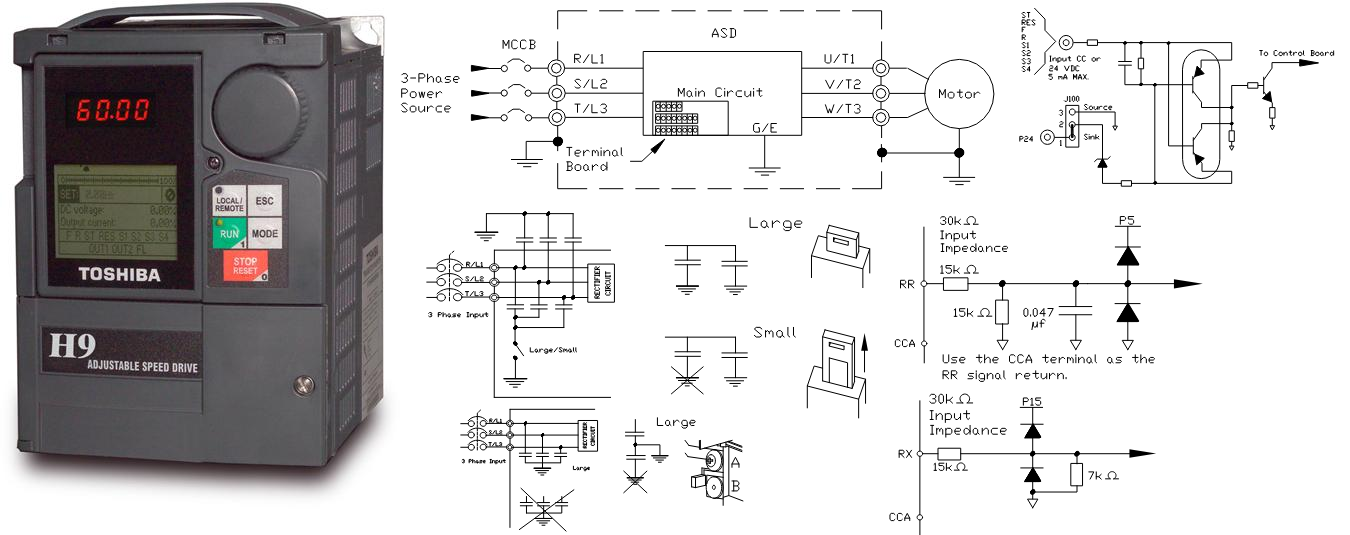
Toshiba H9 Adjustable Speed Drive (ASD)
The Toshiba H9 ASD is an advanced AC drive designed for precise motor control and efficient operation. Equipped with a user-friendly Electronic Operator Interface (EOI), the H9 ASD offers a comprehensive solution for controlling and monitoring motor functions.
Electronic Operator Interface (EOI):
The EOI of the H9 ASD includes an LED screen, an LCD screen, two LEDs, a rotary encoder, and five keys. This interface serves as the primary input/output device for users, allowing them to monitor system functions, input data, perform diagnostics, and view performance data such as motor frequency, bus voltage, and torque.
EOI Operation:
The H9 ASD's software is menu-driven, creating a select and click environment for easy operation. Users can select, view, and change motor operating parameters using the EOI or through communications.
EOI Remote Mounting:
For added flexibility, the EOI can be remotely mounted using the optional ASD-MTG-KIT9. This kit includes all necessary hardware for remote mounting of the 9-Series ASD's EOI, without affecting system or EOI operation.
EOI Features:
LED Screen: Displays running frequency, active faults, or active alarms.
Rotary Encoder: Used for navigating the H9 ASD menu, changing parameter values, and confirming selections.
LCD Screen: Shows configuration information, performance data, diagnostic information, and provides expanded normal text for LED screen information.
Local/Remote Key: Toggles between Local and Remote modes, enabling command and frequency control functions to be carried out via different input sources.
ESC Key: Returns the system to the previous menu level, toggles between screens, or cancels changes.
Run Key: Issues the Run command in Local mode, with LED indicators for operational status.
Mode Key: Accesses the three root menus and loops through them.
Stop-Reset Key: Has multiple functions including issuing the Off command, initiating an Emergency Off Fault, and resetting active faults or alarms.
Monitor Mode:
In Monitor mode, users can view motor performance variables, control settings, and configuration data during operation. This mode is read-only, and settings cannot be changed. However, users can select two monitored items to be displayed on the Frequency Command screen while running.
Main Monitor Selections:
Two items from the Monitor Mode can be selected to be displayed on the Frequency Command screen during operation. The selected items and their real-time values will be shown, providing quick access to important performance data.
The Toshiba H9 ASD's advanced features and user-friendly interface make it a versatile and efficient solution for motor control applications.
+ Used VFD Models
+ VFD Main page -
 -
-