
GT12 Series
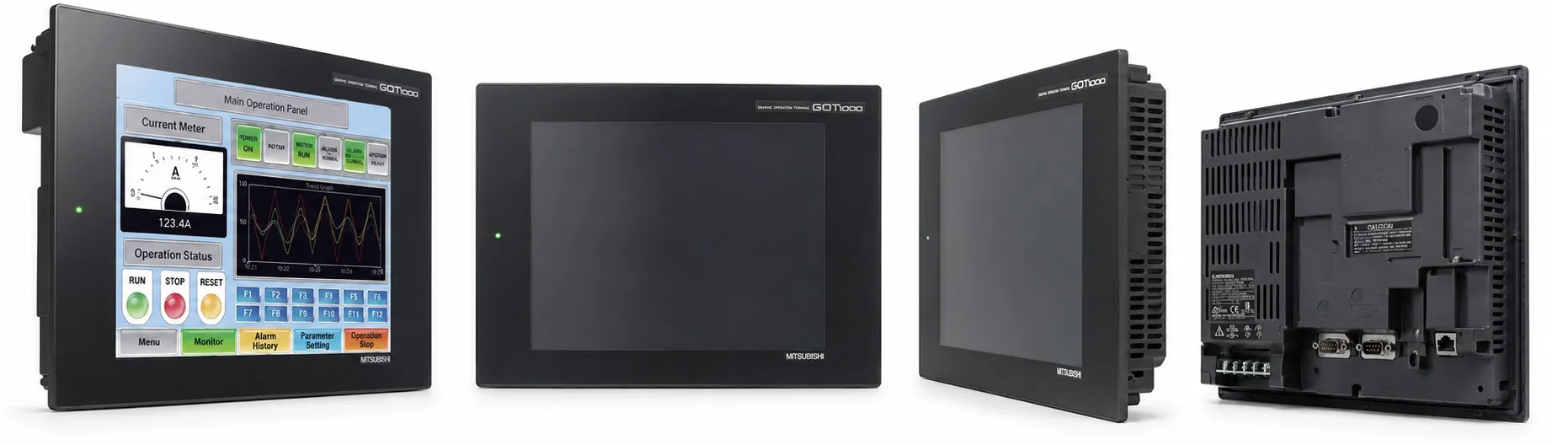
The Mitsubishi GT12 Series Human Machine Interfaces (HMIs) offer advanced functionality, combining compact design with enhanced connectivity and display options. Positioned as a versatile solution for mid-to-large industrial applications, the GT12 Series balances high performance and cost efficiency, making it a suitable choice for various automation requirements.
Models in the GT12 Series:
GT1265
Display: 8.4-inch TFT color LCD
Resolution: VGA (640 x 480 pixels)
Connectivity: Built-in Ethernet, RS-232, RS-422/485 ports
Power Supply: 24V DC
Functionality: Supports networked environments with high-resolution graphics suitable for detailed monitoring and control.
GT1275
Display: 10.4-inch TFT color LCD
Resolution: VGA (640 x 480 pixels)
Connectivity: Ethernet, RS-232, RS-422/485
Power Supply: 24V DC
Application: Ideal for complex systems needing flexible connectivity options and larger display areas for more comprehensive data visualization.
Key Features of the GT12 Series:
High-Resolution TFT Displays: Provides clear and vivid graphics, ideal for both standalone and networked applications. The screens offer enhanced visual clarity, making them suitable for environments where detail is essential.
Multi-Channel Functionality: Enables simultaneous connection to multiple devices such as PLCs, servo drives, and temperature controllers, supporting up to two channels at once for efficient monitoring.
Built-in Ethernet and Serial Connectivity: Equipped with Ethernet, RS-232, and RS-422/485 ports for broad connectivity, facilitating integration with various Mitsubishi devices and other third-party automation equipment.
Advanced Alarm and Recipe Management: Includes an advanced alarm function, recipe management, data logging, and backup/restore functionalities, streamlining operational efficiency and safety.
Ample Memory and Storage Options: With a memory capacity of up to 6 MB, the GT12 series supports complex screens, historical data logging, and graphical displays without performance degradation. CF card compatibility allows data storage and easy transfer for backup purposes.
USB Support for Easy Configuration: A USB mini-B port enables quick data transfers and system updates, making configuration straightforward and reducing setup times on the factory floor.
User-Friendly Software Compatibility: The GT12 Series is supported by GT Works3 software, which includes:
GT Designer3 for designing HMI screens
GT Simulator3 for pre-deployment simulation, ensuring reliability in design and functionality.
Unique Functions and Benefits:
Historical Data Trending: Allows operators to monitor process trends over time, with data visualization through graphs, making it easy to analyze and respond to changes.
Energy Saving Mode and Multi-Language Support: The GT12’s backlight can be adjusted for energy conservation, and the system supports multiple languages, including Unicode, enabling seamless use across global applications.
Integrated Security Features: Multi-level security with password protection enhances operational safety by restricting unauthorized access.
The GT12 Series stands out for its robust connectivity options, high-resolution graphics, and comprehensive feature set, making it a valuable asset for automation systems that require reliable and clear user interfaces.
>> Mitsubishi GT12 Series User manual (pdf)
----------
+ Mitsubishi Automation Homepage
+ Mitsubishi Electric Contact (for Automation Mall)