
How is data transferred between CoDeSys platforms?
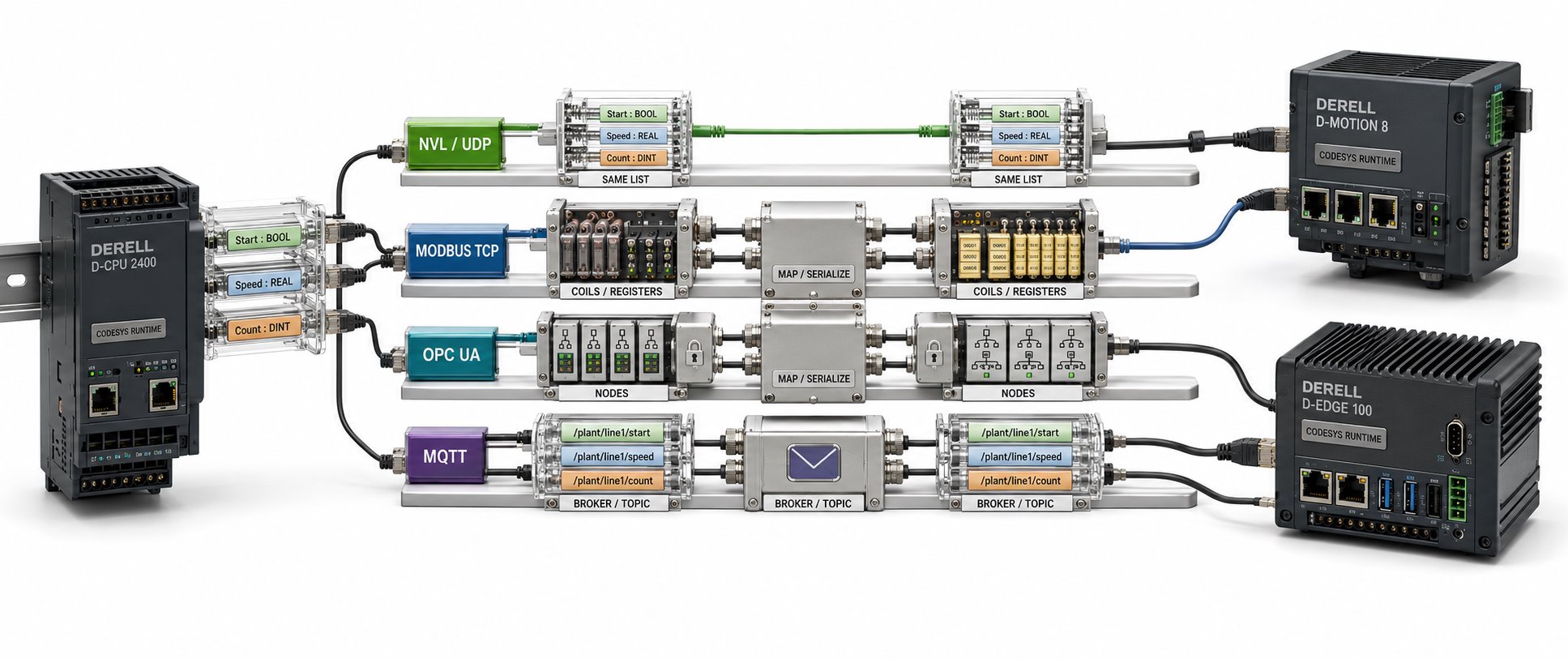
First identify where the data needs to go
Hello, two PLCs running CODESYS can exchange measurements, status information and commands, but using the same development software does not establish communication automatically. You need a suitable communication method, compatible hardware and correct configuration at both ends. Sharing variables inside one application, exchanging live data between PLCs and transferring a project file are different tasks.
Global variables and network variables are different
A global variable in a GVL normally belongs to its application. Creating a variable with the same name on another PLC does not synchronize their values. With a Network Variable List — NVL, sender and receiver lists are configured; data types, variable order, list identifiers and communication settings must match.
The standard CODESYS network-variable mechanism uses UDP and requires target-device support. Assess the transmission interval alongside the task cycle. UDP packets can be lost, so retaining the last received value does not prove that new data is arriving. Data freshness needs its own check.
Modbus TCP: exchanging data through a register map
With Modbus TCP, one PLC can act as client and the other as server. Define the register address, function code, data type and scaling beforehand. Modbus TCP and EtherNet/IP are different protocols; an Ethernet connection does not establish protocol compatibility.
For an agreed 0.1 °C scale, 2535 represents 253.5 °C; Modbus does not impose this scaling. When a 32-bit REAL spans two 16-bit registers, word order and representation must match. Read the device’s data map before implementing conversions in Structured Text.
OPC UA and industrial network options
With suitable client and server support, OPC UA provides access to structured data between PLCs, HMI/SCADA systems and other software. Variables can be read, authorized values written, and changes monitored through subscriptions. Configure certificates, user permissions and security policies; available security features still need correct settings. Check the required CODESYS runtime components and licensing scope.
With fieldbuses such as EtherCAT, CANopen and PROFINET, supported device roles and data mappings are decisive. For example, PROFINET I-Device is an optional feature that can enable data exchange between supporting controllers. Listing the same protocol on both PLCs is not enough. Review the software capabilities together with the device manufacturer’s support information.
When is file transfer appropriate?
Recipes, production records and parameter sets can be transferred as files when the device supports the necessary file-system and transfer functions. Agree on the format, character encoding and a way to indicate that a file is complete. This approach is generally unsuitable for fast cyclic control data. Moving a project archive to another computer is also separate from live variable exchange; copying files does not automatically synchronize application memory.
A practical pump-station example
In a pump-station project, PLC-A could send pressure, running status, a fault code and an incrementing heartbeat counter. PLC-B tracks when that counter last changed. If an application-defined timeout expires, it marks the data invalid and applies the predefined communication-loss behavior. A value displayed on the screen does not prove that the connection is healthy.
For start commands, a command identifier and acknowledgement can help track whether a request was processed. Keeping communication logic in a dedicated function block makes reuse and diagnostics easier. During commissioning, use debugging to verify known test values first, then test disconnection, reconnection and accidental reprocessing of old commands.