
GT1265 series
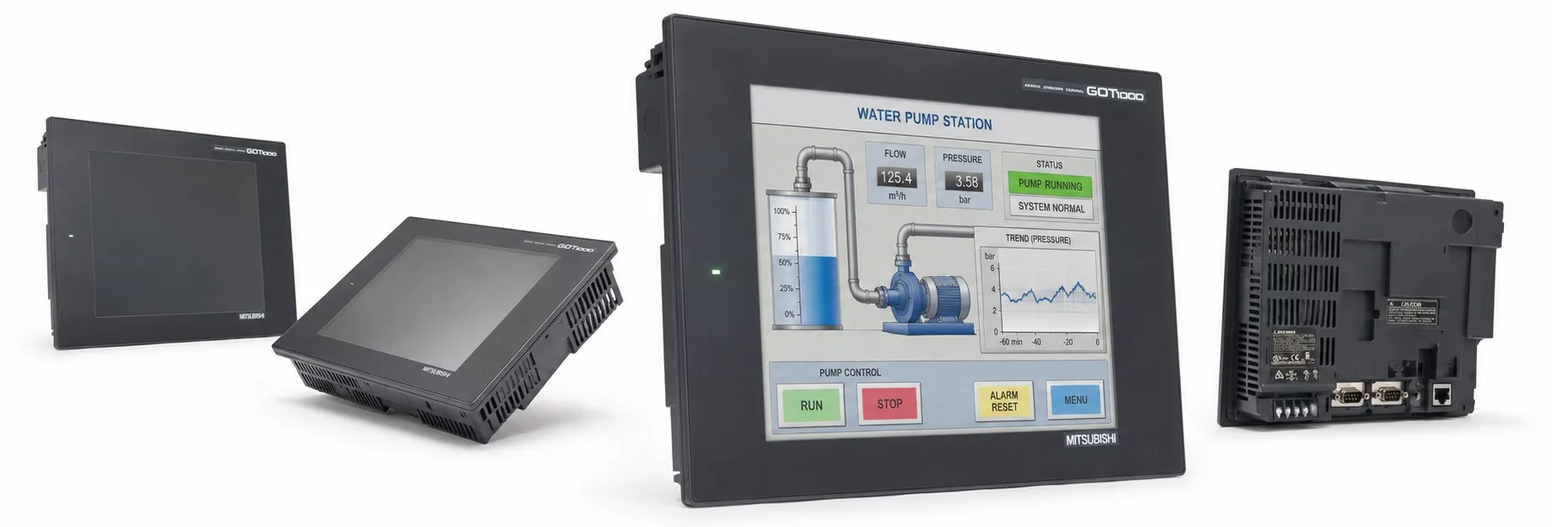
The GT1265 model is part of Mitsubishi’s GT12 series within the GOT1000 HMI lineup, designed to balance advanced functionality with cost efficiency. This model provides a larger screen and enhanced connectivity, ideal for complex automation environments that require flexible user interfaces and reliable data communication.
Key Specifications of the GT1265 Model
Display:
Type: 8.4-inch TFT color LCD
Resolution: VGA (640 x 480 pixels)
Display Colors: 256 colors, ensuring vivid, clear visual feedback
Brightness: 200 cd/m², suitable for various lighting conditions in industrial settings
Viewing Angle: 45° left/right, 20° up/down
Touchscreen: Analog resistive, providing precise touch inputs, suitable for operator interactions in rugged environments
Connectivity Options:
RS-232 Port: For communication with PLCs and other industrial devices
RS-422/485 Port: Supports high-speed, multi-drop communication with various devices, allowing up to 4-channel connections
Ethernet (100BASE-TX): Facilitates networked applications, enhancing connectivity with other automation systems
USB (Mini-B): Supports data upload/download, OS installation, and transparent FA (Factory Automation) functionality
CompactFlash Slot: Offers additional storage options for data logging and project backups
Power Supply: 100-240V AC input, compatible with standard industrial power supplies
Memory Capacity:
User Memory: 6 MB of built-in flash memory for project storage
SRAM Backup Memory: 512 KB, backed by a lithium battery for preserving clock data, alarm history, and recipe information
Software and Programming Compatibility
The GT1265 model is fully compatible with Mitsubishi’s GT Works3 suite, which includes:
GT Designer3: Allows intuitive and flexible screen design, making it easy to create customized HMI displays
GT Simulator3: Enables pre-deployment testing of HMI functions, allowing developers to ensure accurate functionality before implementing on-site
These tools support efficient HMI screen development and functional testing, reducing configuration time and ensuring user-friendly interface designs.
Notable Functionalities
Enhanced Alarm Functions: Supports comprehensive alarm management, including historical alarm data storage and color-coded alarm displays for immediate operator response.
Recipe Management: The GT1265 offers recipe functionality, allowing operators to store and quickly access various configuration settings. This is useful in applications that frequently change operational modes.
Multi-Language Support and Unicode Compatibility: Allows easy switching between multiple languages, making it suitable for diverse, multi-lingual work environments.
Data Logging and Backup Features: Equipped with CF card support, allowing historical data to be logged, stored, and backed up, facilitating easy data analysis and restoration if needed.
Application Scenarios for GT1265
The GT1265 is an optimal choice for:
Networked and Distributed Control Systems: Its Ethernet and multi-drop RS-422/485 capabilities allow seamless integration into complex systems that need robust, reliable communication across multiple nodes.
Industrial Environments Requiring Large Displays: The 8.4-inch VGA display offers enough visual space for detailed monitoring and control, making it suitable for operations requiring significant interface visibility.
>> Mitsubishi GT1265 User manual (pdf)
----------
+ Mitsubishi Automation Homepage
+ Mitsubishi Electric Contact (for Automation Mall)